


You can log in to your Deriv MT5 account via the MT5 desktop app, web terminal, or mobile app. You'll need the login ID and server name from your Deriv MT5 dashboard. Please use your Deriv MT5 password to log in to Deriv MT5.
Drag the XML file from your computer onto the workspace, and your bot will be loaded accordingly. Alternatively, you can hit Import in Bot Builder, and choose to import your bot from your computer or your Google Drive.
Importing from your computer
- After hitting Import, select Local and click Continue.
- Select your XML file and hit Open.
- Your bot will be loaded accordingly.
Importing from your Google Drive
- After hitting Import, select Google Drive and click Continue.
- Select your XML file and hit Select.
- Your bot will be loaded accordingly.
No, your account safety is your sole responsibility. Please visit our blog to learn safety tips on identifying and reporting phishing attempts.
To see your account’s trading limits, go to Settings > Security and safety > Account limits.
Yes, Deriv cTrader offers stop loss, take profit, pending orders, and other risk-management tools.
Your Deriv P2P account may be blocked for one of the following reasons:
To estimate overnight swap charges:
- Select the Symbol: Choose the trading instrument you want to calculate the swap charges for.
- Enter the Volume in Lots: Provide the position's size in lots.
- Enter the Asset Price: Input the asset’s price at the end of the day (UTC server time).
- Click on Calculate: The estimated overnight swap charges will appear in the Results section on the right.
The Results section will display the following:Swap Charges:
- Swap Charges: The relevant charges for long (buy) and short (sell) trades converted to USD.
- Calculation Type: The method used to compute the swap charges.
- Triple Swap Day: The specific day where swap charges are tripled.
- Weekend Swaps: Indication of whether swaps are applied over the weekend.
A strategy provider is an account that other traders can copy trades from. On Deriv Nakala, strategy providers can be from different brokers, so you're not limited to copying strategies from other Deriv accounts.
Here's how you can install the Deriv Trader PWA on your iOS device:
1. Open your browser on your device.
2. Go to Trader’s Hub and select Deriv Trader.
3. Tap the Share icon (square with an arrow) at the bottom of the browser.

4. Select Add to Home Screen.

5. Tap Add to confirm.

6. Deriv Trader PWA is now on your home screen.

Hit Open next to your Deriv X account.
A pop-up will appear showing your account credentials.
Yes. Contact us via live chat, and we'll help you through it. We'll need the following information:
- Name of entity
- Certificate of incorporation
- Memorandum and articles of association
- List of directors
- List of shareholders
- Authorisation to manage the account (if your business has more than one director)
- Passport and utility bill/bank statement of the person managing the account and of each director and shareholder (if your business has more than 1)
- Utility bill/bank statement containing the address of the business
- Source of wealth documentation
We may request more information during the signup process.
1. Go to your Deriv MT5 dashboard.
2. Click Trade on your preferred MT5 account, then click the pencil icon next to the password section.
3. Select Investor password to set a new password.
In Bot Builder, hit Reset on the toolbar at the top. This will clear the workspace. Please note that any unsaved changes will be lost.
No, Deriv doesn’t offer rewards for reporting scammers.
The currency conversion for your deposits and withdrawals are done by your payment service provider. For example, if you use Skrill, your transaction amount will be converted by Skrill. Please check with your service provider regarding the conversion rates used for your deposits and withdrawals.
Synthetic indices and cryptocurrencies are available for trading 24/7.
In the Copy tab of your Deriv cTrader account, search for strategy providers. Pick your favourite strategies, allocate funds, and start copy trading.
You can use any payment method you want as long as it is agreed with the trader you’re dealing with.
Note: Deriv has no control over payments made between Deriv P2P traders. Please ensure you follow the payment instructions as agreed between you and the trader you are dealing with, and provide your preferred method of payment and instructions when you post your ads.
For further information, see Section 4 on Deriv P2P in our terms and conditions.
You can find the end-of-day price in your trading platform by following these steps:
- Open the chart for the trading instrument you're analysing.
- Adjust the chart's time interval to "D" (Daily).
- Find the end-of-day price at the "C" (Close) value at the bottom of the chart, on the relevant daily candle.
Example:
The end-of-day price for EUR/USD on 02/01/2025 is 1.02677.

Follow these steps:
- Go to Discover and search for a trader you want to copy.
- Select your preferred trader and tap Copy.
- Choose your trade size based on:
- Proportional by equity: Adjusts trade size proportionally to your account balance.
- Mirror master size: Matches trade size of the strategy provider.
- Fixed size: Uses a fixed trade size for all copied trades.
- Optional:
- Select "Round up to minimum trade size" to ensure no trades are missed.
- Select "Copy existing trades" to copy any open trades.
- To confirm, select "Agree and Copy".
- Next, agree to the Social Trading Authorisation and Subscription Terms (STAST).
- Press OK to complete the setup, or select "Max drawdown" to set auto-stopping conditions.
Once installed, Deriv Trader PWA appears as an app icon on your phone home screen. Tap the icon to open it and log in with your Deriv credentials.
Follow these steps to add a real Options & Multipliers account:
- Select Real from the dropdown menu.
- Hit Get next to Deriv account.
- Follow the instructions to choose your currency, complete your personal details and address, and accept the terms.
- Your real Options & Multipliers account is ready. Make a deposit to begin trading.
It depends on the laws in your country of residence. Please get professional advice on whether you're required to pay taxes on your profits.
You can find your Deriv MT5 server name on your Deriv MT5 dashboard. Click Trade on your preferred MT5 account and look for the server below the broker name.
- Hit Reset at the bottom of stats panel.

- Hit OK to confirm.

For security reasons, all confidential requests and issues are done via live chat with our Customer Support team.
To cancel your withdrawal, follow these steps:
- Go to Withdrawal.
- We'll send you an email with a verification link. Click that link.
- You’ll be brought back to the Withdrawal page. Click Review pending and select the transaction that you'd like to cancel.
- Click Yes to confirm the cancellation. Your funds will be returned to your Deriv account, and your account balance will be updated.
Note: You cannot cancel withdrawals if your withdrawal request has already been authorised and processed.
Deriv multipliers combine the upside of leverage trading without the downside of losing more than your stake. This means that when the market moves in your favour, you'll multiply your potential profits. If the market moves against your prediction, your losses are limited only to your stake. To find out more, visit the Options page.
Follow these steps:
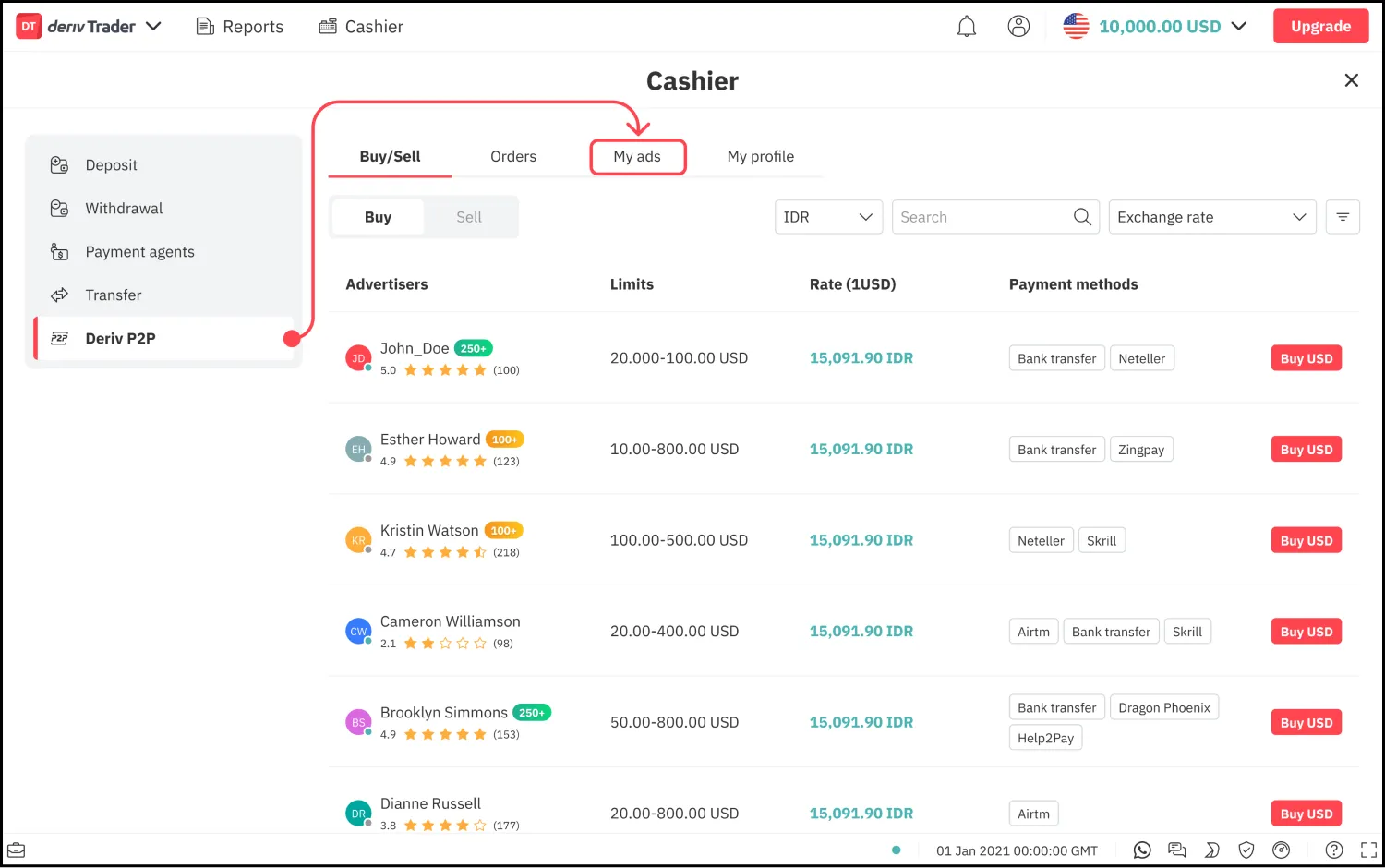
- Go to Deriv P2P > My ads.
- Hit Create new ad.
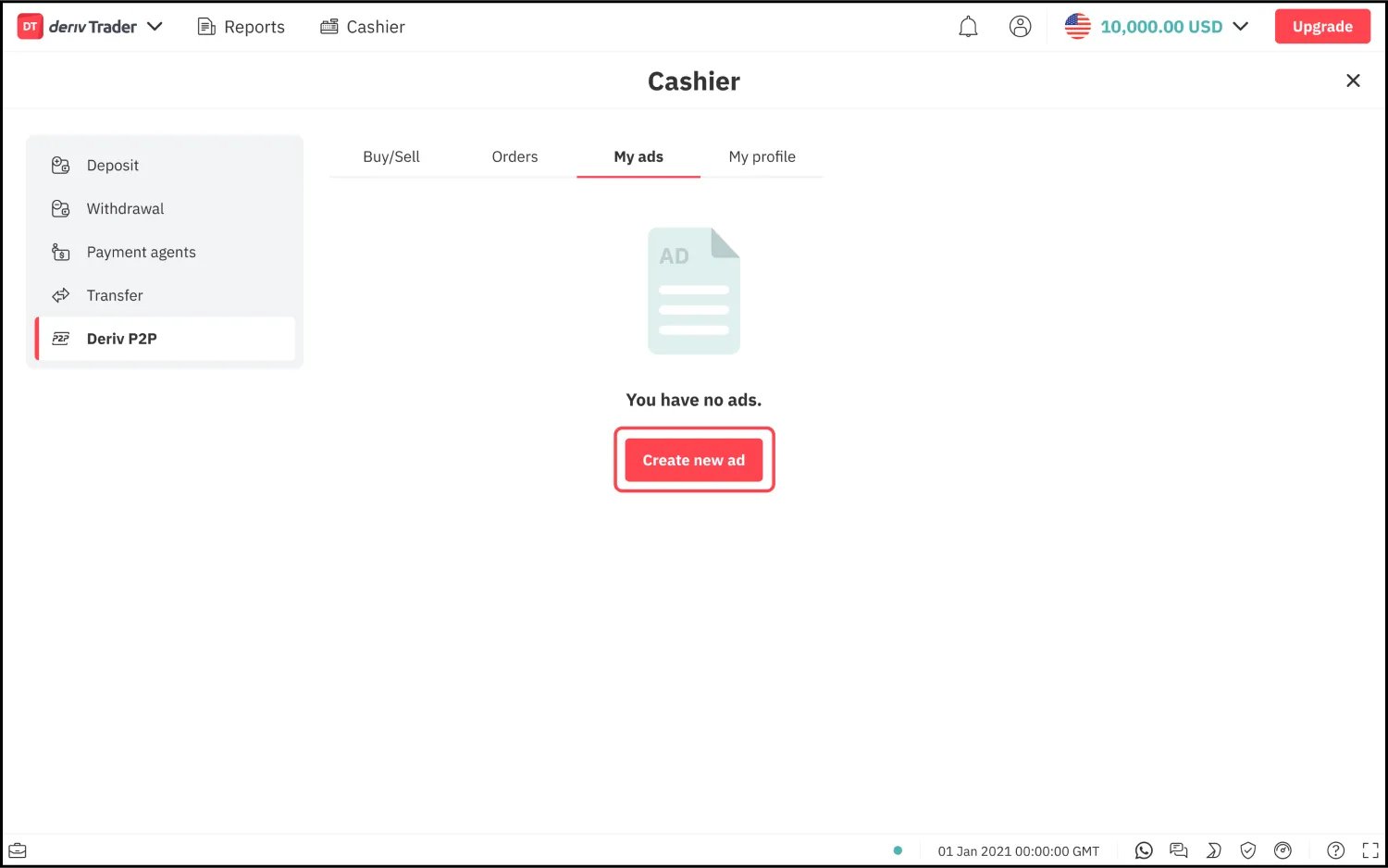
- Fill up the form and hit Post ad.

Once your ad is created successfully, it will appear on the Buy/Sell page.
Note: You’ll only be able to create ads once your account has been verified. To learn more about verifying your account, see How do I verify my account?
To estimate the pip value:
- Select the Symbol: Choose the trading instrument you want to estimate the pip value for.
- Enter the Volume in Lots: Provide the position size in lots.
- Enter the Asset Price: Input any price value (this will not impact the pip value calculation).
- Click Calculate: The estimated pip value will be displayed in the Results section on the right, in USD.
Note: For every 1 pip movement in the market, your P&L will change based on this pip value.The size for 1 pip will be shown beneath the symbol once you select it.
You’ll no longer copy new trades from that trader, but existing copied trades will remain open unless you close them manually.
No. Deriv Trader PWA updates automatically when Deriv makes changes, so you’ll always have the latest version with no action required from your end.
As per our terms, we only allow one account per client, which you can open in the currency of your choice (either fiat or crypto). You can add multiple cryptocurrency accounts to your profile if you want to trade with other currencies.
There are several ways to control your losses with Deriv Bot. Here’s a simple example of how you can implement loss control in your strategy:

1. Create the following variables and place them under Run once at start:
Stop loss threshold - Use this variable to store your loss limit. You can assign any amount you want. Your bot will stop when your losses hit or exceed this amount.
Current stake - Use this variable to store the stake amount. You can assign any amount you want, but it must be a positive number.
This is how your trade parameters, variables, and trade options should look like:

2. Set the Purchase conditions. In this example, your bot will purchase a Rise contract when it starts and after a contract closes.

3. Use a logic block to check if Total profit/loss is more than the Stop loss threshold amount. You can find the Total profit/loss variable under Analysis > Stats on the Blocks menu on the left. Your bot will continue to purchase new contracts until the Total profit/loss amount exceeds the Stop loss threshold amount.

If you believe you have been phished or your credentials have been compromised, it's important to take these immediate actions to protect your online accounts and personal data:
- Change your password: Change the password for your account immediately. Use a strong, unique password, which can be generated with password management tools.
- Enable 2FA: If your account supports two-factor authentication (2FA), enable it. This provides an extra layer of security by requiring a second verification method (e.g., a code sent to your phone) to access your account.
- Check your accounts: Review all your other online accounts (email, social media, banking, etc.) to ensure they haven't been compromised as well. If you use the same password for multiple accounts, change those passwords too.
- Scan for viruses: Run a full system scan on your computer and any devices you used to access your account. Make sure your antivirus and anti-malware software is up to date.
- Monitor accounts: Keep a close eye on your accounts for any suspicious activity. This includes checking for unauthorised transactions, changes to account settings, or new login attempts.
- Notify Deriv: Contact our Customer Support team via live chat. Please have the scammer account’s information and evidence/screenshots ready so we can take appropriate action as soon as possible.
No. To keep your funds safe, you are strictly prohibited from using payment methods that are not yours. If you do use someone else’s payment method, we’ll suspend your Deriv account for security purposes.
Click the Reset button at the bottom left of the trading calculator. All fields will be cleared, allowing you to input new trade details.
To become a strategy provider on Deriv Nakala, you'll need to have:
- A Deriv MT5 Standard account with a minimum balance of 500 USD
- 6+ months of trading experience with consistent positive results
If you meet the above criteria, follow these steps become a strategy provider on Deriv Nakala:
- When linking your account, select "Become a Strategy Provider".
- Complete the assessment form and questionnaire.
No. You’ll need an internet connection to log in and trade on Deriv Trader PWA.
No, you can’t transfer funds between EU and non-EU trading accounts.
You can create an API token. Give your token a name, select the scope, and click Create.
Yes, you can. However, there are limits on your account, such as the maximum number of open positions and maximum aggregate payouts on open positions. So, keep these limits in mind when opening multiple positions. You can find more information about these limits in Settings > Account limits.
This is due to the spread, which is the difference between the ‘bid’ and ‘ask’ prices. Your positions will start earning a profit when the market moves in your favour.
Here are a few steps you can take immediately when you discover unrecognised transactions:
- Notify Deriv: Contact our Customer Support team via live chat. Please have the scammer account’s information and evidence/screenshots ready so we can take appropriate action as soon as possible. Depending on the severity of the situation, we may temporarily freeze or close your account to prevent further unauthorised transactions.
- Change your Deriv password: Change the password for your account immediately. Use a strong, unique password, which can be generated with password management tools. If you use this same password for other accounts, make sure you change those, too.
- Monitor your accounts: Keep a close eye on your accounts for any suspicious activity. This includes checking for unauthorised transactions, changes to account settings, or new login attempts.
Your payment method will only appear on the Withdrawal page after you've made your first deposit. If you've made a deposit and still don't see your payment method on the Withdrawal screen, it's probably because the payment method you used for the deposit cannot be used for withdrawals. In this case, you may need to use a different payment method that supports withdrawals, too. Contact us via live chat if you need help.
Follow these steps:
- Go to Deriv P2P > Buy/Sell.
- Select Buy or Sell ads.
- Choose the ad you want by clicking Buy or sell.
- Fill up the form and click Confirm.
Note:
- You'll only be able to make an order once your account has been verified.
- If you're buying, you'll need to make payment and share your payment confirmation with the seller. Once the seller has confirmed that they've received your payment, the exchange amount will be credited into your Deriv account.
- If you're selling, you'll need to wait for the buyer's payment before completing the order.
To calculate margin required to open a CFDs position, use the following formula:
Required Margin USD = Volume in USD ÷ Effective Leverage*
* Use the denominator of the Effective Leverage ratio, 1 : XXXX.
To calculate the Volume in USD, use the following formula:
Forex: Lots x Contract size x Conversion Rate Base currency* to USD
Other: Lots x Contract size x Execution Price x [Conversion Rate of Base currency* to USD]
*in Deriv MT5, this is called “Margin Currency”. You'll be able to see Margin Currency in the instrument specification table in your trading terminal.
Check that your subscription is active and properly linked to your Deriv MT5 account. Ensure there is sufficient balance in your account, and that your MT5 platform is running. If the issue persists, review your settings or contact us via live chat.
Yes, but you need to apply for this feature by following these steps:
- Go to Account.
- Select "I want to charge my copiers".
- Submit your application for review.
If you don’t see the option to Install (Android) or Add to Home Screen (iOS), it could be due to the following reasons:
- You’re not using a supported browser (use Chrome on Android or Safari on iOS).
- Your browser is out of date.
If you're using a supported browser but the option is still missing:
- Close and reopen your browser.
- Reload the platform page.
If the option still doesn’t appear, contact us via live chat for assistance.
No, we don't offer cryptocurrencies on Deriv Bot.
Yes, we do. You can create a swap-free Deriv MT5 account in the Trader’s hub.
Our social media profiles are at the bottom of our website and emails. Deriv has only one official account per social media platform.
- Facebook: https://www.facebook.com/derivdotcom
- Instagram: https://www.instagram.com/deriv_official/
- Twitter/X: https://twitter.com/derivdotcom/
- Youtube: https://www.youtube.com/@deriv
- LinkedIn: https://www.linkedin.com/company/derivdotcom/
Please generate an address on the cryptocurrency deposit page whenever you want to make a deposit. Always use a freshly generated address to ensure accuracy.
To calculate the swap charges required for overnight CFDs positions, use the following formulas:
For swaps in points:
Volume in lots x Contract size x Point Size* x Swap Rate
*Point Size = 1/10^digits. You can find the digits value in the instrument specification table in your trading terminal.
For swaps in percentage:
(Volume in lots x Contract Size x Rollover Price*) x (Swap Rate ÷ 100) ÷ 360
*Rollover Price = The last price of the day before rollover is processed
Use Deriv MT5’s performance metrics to evaluate providers based on factors such as historical performance, trade frequency, and drawdowns. Compare these to your preferences.
Performance fees are a percentage of copier profits, charged only on earnings above the High Water Mark. They are calculated automatically based on profitable trades.
If you're residing in the EU or UK, contact us via live chat, and we'll help you.
If you reside in any other country, you can adjust or remove your limits on the Self-exclusion page. If you’re unable to change your limits, let us know via live chat.
No, we don't. However, you'll find quick strategies on Deriv Bot to help you build your trading bot for free.
You can't reactivate your Deriv MT5 account. Instead, you can create a new one on your Deriv MT5 dashboard.
You can use any wallet to make the deposit as long as the wallet supports the network we are using.
The completion rate is the percentage of orders that the advertiser could complete within 1 hour.
To calculate the pip value of your trades, use the following formula:
Pip value USD: Pip Size* x Lots x Contract Size ÷ Conversion rate of account currency to USD
*Pip size:
- Forex - non JPY pairs = 0.0001
- Forex - JPY pairs = 0.01
- Other = 1/10^digits
For instruments without weekend swaps, a triple swap is applied on one designated weekday. Please check your trading terminal for specific details.
If your signal provider stops trading, you can check their activity status, decide on how you want to manage any ongoing open trades you copied from them and consider unsubscribing from the inactive provider. You can explore other signal providers that fit your expectations.
Once approved as a strategy provider, follow these steps:
- Go to Account.
- Tap Set Fee, then Performance Fee.
- Set your performance fee which can be up to 50%.
- Confirm by tapping Agree and Update.
You may reactivate your account by logging in with your email address and password. If you're unable to do so, please contact us via live chat, and we'll help you further.
We offer our services in all countries except for the ones mentioned in our terms and conditions.
No, you can't. There's a fixed default amount for each asset. The leverage applied to your account can be found on your Deriv MT5 dashboard.
There is no minimum deposit for cryptocurrency. The minimum withdrawal is not fixed, so please check for the amount on the Withdrawal page.
We have a diverse suite of 8 trading platforms: Deriv MT5, Deriv Nakala, Deriv cTrader, Deriv Trader, Deriv Bot, Deriv GO, and SmartTrader. Each platform is designed to fit any trading style, regardless of your trading experience.
The Buy/Sell tab shows you ads by other advertisers. You can see your ads in the My ads tab.
Requirements include maintaining an active Deriv MT5 account, demonstrating consistent trading activity, and complying with the guidelines for signal providers.
Performance fees are paid out to strategy providers daily if the copiers are Deriv users, and monthly if the copiers are external users.
No, Deriv Bot will stop running when your web browser is closed.
No. Fund transfers can only be made within your own accounts.
If you encounter any issues with a transaction on Deriv P2P, first try to resolve it with the trader you’re dealing with. If they’re not willing to help, please let us know via live chat, and we’ll help you resolve it.
To dispute a Deriv P2P transaction, follow these steps:
- Once the order has expired, click Complain on the order details screen.
- Complete the form and click Submit.
We’ll seek more info on the transaction by reaching out to you and the trader you are dealing with, and we’ll try to resolve the issue within 6 hours. We’ll keep you informed of the status.
For further information, see Section 4 on Deriv P2P in our terms and conditions.
Maintaining consistent trading activity and providing clear descriptions of your trading style can help attract subscribers.
Make sure to:
- Use your trading password.
- Enter correct Deriv MT5 details.
- Click Open next to your MT5 account on Trader's Hub to get the info.
- For "Account number", use your Deriv MT5 login ID.
- If you have a strategy provider account, close all open trades in your existing linked account before connecting a new one.
Three of the most commonly used strategies in automated trading are Martingale, D'Alembert, and Oscar's Grind — you can find them already made and waiting for you in Deriv Bot.
If you need a statement of your trades on Deriv MT5, follow these steps to download a 3-month statement:
1. Log in to your MT5 account via the desktop app.
2. Go to the History section.
3. Right-click on Time, click Report and select Open XML.
4. Your Deriv MT5 history will be downloaded as an XML file.
If you need a statement for a more extended period, contact us via live chat, and we'll help you.
Foreign exchange, or forex, is the global market of the world’s currencies, where the values of different currencies are pitted against each other in the form of forex pairs, such as EUR/USD, AUD/JPY, etc. The forex market determines the exchange rates of each currency.
Read this article to learn more about trading forex on Deriv.
You can see your available balance in the My profile tab.
Note:
Your available balance for Deriv P2P may not reflect your entire Deriv balance. This is because deposits made via some payment methods won’t be available for Deriv P2P. See Why is my Deriv P2P balance different from my Deriv account balance? for more info.
Subscribers will stop receiving trades if signals are paused or discontinued. You may want to inform subscribers if you plan to make changes to your signal availability.
- Go to Account.
- Tap Settings and then Account Information.
- Select the X" button, causing the popup "Unlink trading account" to appear.
- To unlink, select Yes.
Watch this video to learn how to build a trading bot on Deriv Bot. Also, check out this blog post on building a trading bot.
A commodity is either grown or produced naturally in the environment, such as agricultural products, livestock, crude oil, and precious metals like gold and silver. Read this article to learn more about trading commodities on Deriv.
To make successful Deriv P2P transactions, follow these guidelines:
- If you have active orders, keep the app open (either on your phone or computer) until your orders are completed. Try to complete your orders within 1 hour.
- Ensure that you’ve entered the correct amount and exchange rate in your ads.
- Avoid creating ads with identical amounts and exchange rates.
- Ensure that your account balance is sufficient to support your ads and orders.
If you’re buying:
- Ensure that you make payment to the correct seller within 1 hour.
- After making your payment, share the receipt with the seller via the chat feature in Deriv P2P.
If you’re selling:
- Check your bank or e-wallet balance to confirm that the buyer has made payment before completing the order.
- Once you’ve received the payment from the buyer, try to complete the order as soon as you can.
For further information, see Section 4 on Deriv P2P in our terms.
To delete your account, follow these steps:
- Go to Account.
- Tap Settings and then Account Information.
- Select Delete Account.
- Once your account is deleted, you will be logged out automatically.
You can use your Deriv MT5 demo account for as long as you want. However, if your account is inactive for 30 days, we'll deactivate it automatically. You can still create a new one in the Deriv MT5 dashboard.
Stock indices measure the value of a group of companies in the stock market. This allows investors to see how a particular set of assets is performing. Read this article to learn more about trading stocks on Deriv.
Use the chat feature in Deriv P2P to communicate with the trader you're dealing with.
Note: The chat feature is only available for active orders. Once an order is complete, the chat feature disappears.
Yes, we’ll transfer your balance to your Deriv account before your Deriv MT5 account is deactivated.
Derived indices consist of asset prices generated from real-world and simulated markets and indices, with little to no influence from real-world events. You can trade from a variety of derived indices, including synthetic indices, derived FX indices, tactical indices and baskets.
Available 24/7, our synthetic indices emulate price movements of real-world markets with varying levels of volatility. As they aren't based on actual underlying assets, they are unaffected by real-world market events. Read this article to learn more about trading synthetic indices on Deriv.
Derived FX indices are simulated assets with prices derived from the price movements of real major forex pairs. Our algorithms track real-world currency prices and dampen fluctuations caused by news events and market sentiment. Plus, you can choose to trade them at the volatility you prefer.
Tactical indices are simulated instruments designed to capture short-term market trends using signals from popular technical indicators. They provide structured price action that reflects common trading strategies and are unaffected by real-world market events.
With basket indices, you can trade your favourite asset against a basket of five major global currencies, each weighted by 20%.
Due to regulatory requirements, derived indices are unavailable in some countries. Refer to ‘Product offering’ in our terms of use for more information.
