Wetin be Expert Advisor trading?
If you dey wonder wetin Expert Advisor (EA) be, no be only you! EA na automated trading programme wey dey run inside platforms like MT5 and cTrader MT5. E fit open, manage, and close trades based on rules wey you don set before. Wit artificial intelligence automated trading, you fit now create or improve your own expert advisor for trading easily, even if your coding experience limited.
Why you go use AI create your expert advisor
To create EA fit look difficult, especially if you no get coding experience. Di good news be say AI now dey allow both beginners and experienced traders create expert advisor robots by simply explaining trading rules for plain language. AI models like Claude, ChatGPT, and Gemini dey turn your trading ideas into code wey dey work, making expert advisor trading easier for more pipo to use and more powerful.
1. How to select di right AI model to create expert advisor
To start, choose AI model wey go generate your EA code. Di most popular options include:
- Claude (from Anthropic): e dey produce well-structured code.
- ChatGPT (from OpenAI): pipo know di paid version especially well for coding tasks. Use GPT-4 (o1) to create di initial logic and prompt, and GPT-4o (o3 mini) to improve di output.
- Gemini (from Google AI): e also fit produce algorithmic trading code.
Try each model to find di one wey best suit your approach and needs.
2. How to prompt AI to create expert advisor
Before you generate code, you fit ask di AI to help you define or improve your trading logic, especially for advanced strategies. You fit skip dis step, but e fit significantly improve di results.
Once you ready, use clear, well-structured prompt.
For example:
“You be expert MQL5 coder. Create fully functional expert advisor (EA) for MQL5 based on di following logic and rules. Add clear comments so di code go easy to follow. Provide di complete .mq5 source code inside triple backticks for di end.”
Next, explain your strategy. For example:
- Use 50-period Simple Moving Average (SMA) and 200-period SMA.
- Enter buy trade wen di 50 SMA cross above di 200 SMA for di H1 timeframe.
- Close di trade wen di SMA cross back down.
- Set stop-loss for di last swing low.
- Risk 1% of account Balance per trade.
Di more specific your instructions be, di more accurate and useful di AI output go be.
3. How to copy and test your AI-generated EA code
For Deriv MT5 (MQL5)
- For di Deriv MT5 toolbar, click IDE.
- For di top left corner, select New and choose Expert Advisor.
- Enter name for your EA and follow di prompts.
- Paste your AI-generated code inside MetaEditor and check for errors.
- Backtest di EA to make sure say e dey work as you expect.
- If everything look good, return to MT5, open Navigator → right-click Expert Advisors → Refresh.
- Drag your EA onto chart and enable Algo Trading.
For Deriv cTrader (C#)
Ask di AI for cBot in C#. Use clear, detailed prompt, like dis:
“Write cTrader trading bot (cBot) in C# wey go enter buy trade wen di RSI (14) dey below 30, and di price close above di 20-period EMA for di H1 timeframe. Exit di trade wen RSI reach 70. Risk 2% of Balance per trade.”
- Di more specific your prompt be, di better di output go be.
- If you encounter errors, paste di error messages back into di AI; e fit usually help you resolve di issues.
4. Common AI mistakes wen you dey create EA for trading and how to fix dem
AI-generated code no dey always perfect. Na some issues wey you fit encounter and dia solutions be dis:
Issue 1: “Undeclared identifier” error for MQL5
Fix: Di AI fit use variable or function wey no dey defined. Check indicator calls like iMA() or iRSI() again to make sure say dem dey correctly specified. Buy/sell functions wey dey missing
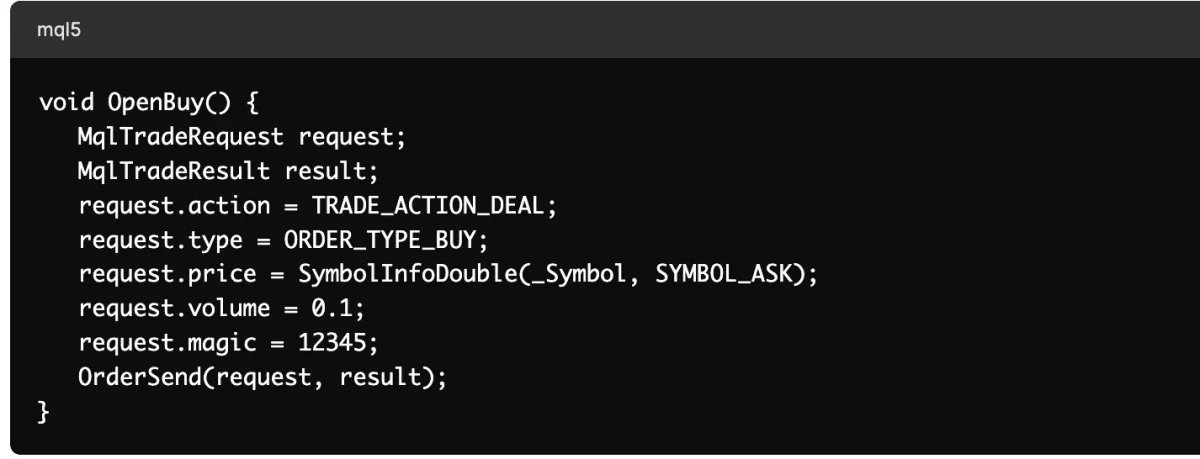
Issue 2: Buy/sell functions wey dey missing
Fix: Add trading functions manually. For example:
Issue 3: Trade logic no dey work for Deriv cTrader
Fix: Make sure say your code dey inside di correct event handler, like OnBar() or OnTick()
Issue 4: Incorrect lot size calculation
Fix: Di AI fit calculate position size based only on account Balance, without considering contract size. Dis fit result in trades wey too large or too small. Always run backtest and adjust di formula if necessary.
5. Best practices for using AI for trading
Even though AI fit produce code wey dey work, di code fit no dey efficient or reliable. Consider dis suggestions to improve your EA:
- Add error handling for unexpected Market conditions.
- Use trailing stop-loss to lock in profits.
- Run backtests to optimise strategy performance.
- Review di code manually or use di MetaEditor Debugger for Deriv MT5.
6. E dey come soon: AI Debugging Agent
Dem dey develop new AI-powered EA Debugging Agent. Wen dem release am, e go:
- Automatically fix syntax errors for AI-generated code
- Improve execution efficiency
- Explain each line of code in simple terms
Dis tool go make debugging faster and easier for more pipo, so look out for updates.
How everything come together
Wit di AI tools wey dey available today, e don easier pass before to build expert advisor for Deriv MT5 or Deriv cTrader. If you provide clear prompts and carefully test your code, you fit create, refine, and improve your own trading algorithms. If you encounter challenges, check di common fixes and suggestions wey dey above.
You ready to create your own automated trading strategy? Create your first EA wit Deriv MT5 or cTrader and use AI bring your strategy to life.
FAQs