Start trading wit Deriv MT5: Overview of di Tool Box
Deriv MT5 Toolbox na important part of di platform for traders wey want manage dia trading activities well. Dis lesson go build on di video by giving you detailed overview of di toolbox features, wetin dem dey do, and tips on how to use dem to improve your trading strategies. Wen you understand how to navigate and use dese tools, e go help you make trading decisions wey get better information behind dem.
Di Trade Tab: How to Monitor Your Positions
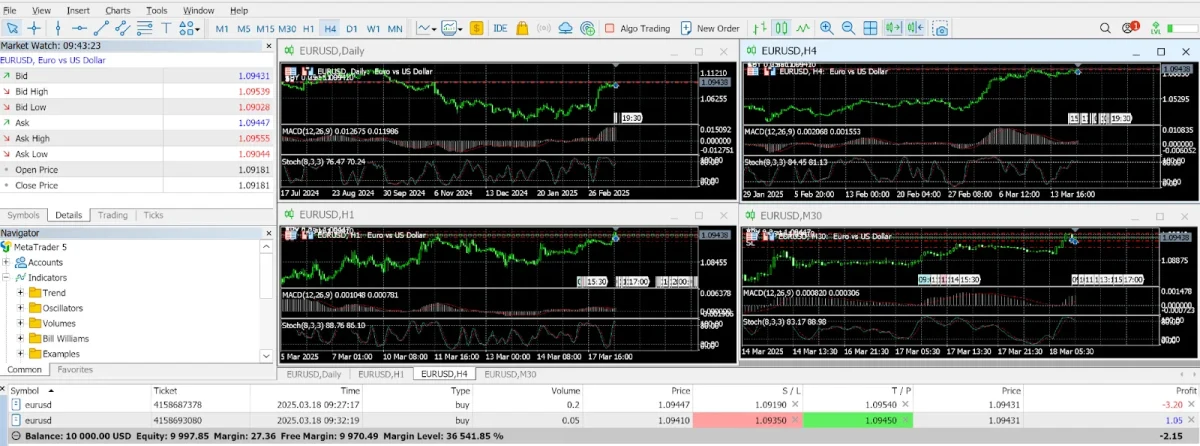
Di Trade tab na di first place traders dey go wen dem use di MT5 platform. E dey show important information about your current open positions, pending orders, and your overall account stats, including:
- Symbol: Di trading instrument wey you dey trade currently.
- Ticket: Unique identifier for each position or pending order.
- Time: Di time wey you open position or place order.
- Type: Di type of order (for example, Buy, Sell, Buy Limit, and oda types).
- Volume: Di total size of di trade, wey dem measure in lots or units.
- Price: Di entry price of your trade or di entry price wey you want for pending order.
- Stop Loss (S/L) & Take Profit (T/P): Di levels wey you set to automatically exit trades, so you fit reduce losses or secure profits.
- Current Price: Di latest market price for di asset wey you choose.
- Value: Di current market value of your position, wey dem calculate based on di current price and contract size.
Wen you understand di different metrics for di Trade tab, e go help you track your trading performance and make decisions on time.
How to Understand di Exposure Tab
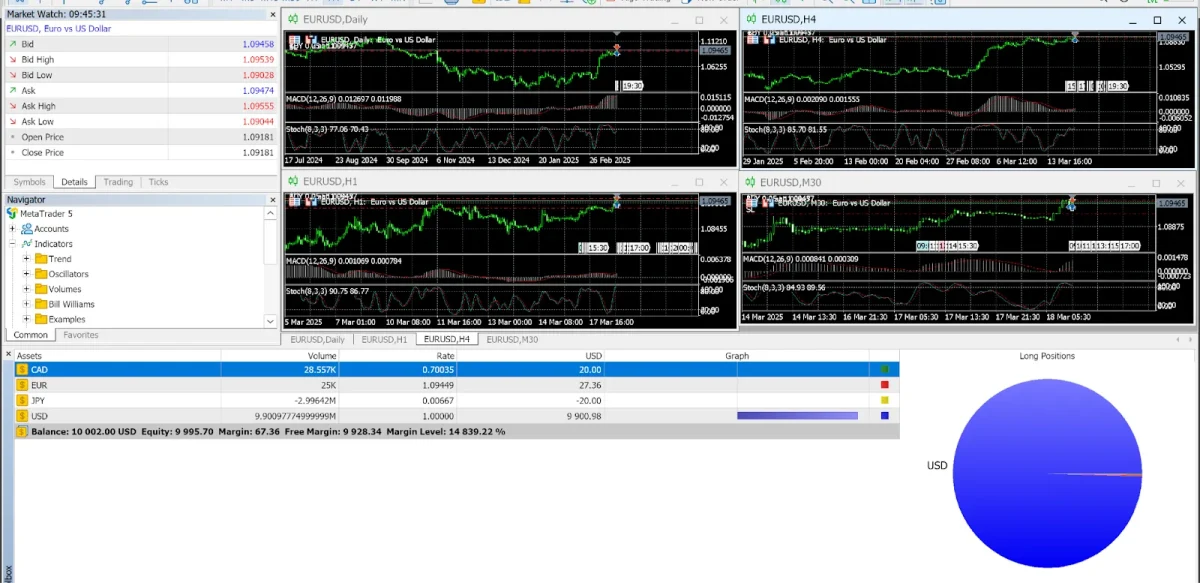
Di Exposure tab dey give detailed summary of your total asset exposure for all open positions. For here, you fit monitor:
- Assets: Di names of di currencies or instruments wey you dey trade.
- Volume: Di total volume of your open positions, wit leverage included for di calculation.
- Rate: Di current exchange rate for each trading instrument, wey dem show in your account base currency.
- Illustrative Graph: Graph wey dey show your exposure across different assets, and help you quickly identify long and short positions.
Wen you monitor your exposure, e go help you make adjustments wen necessary and manage risk well across multiple trades.
History and Journal: How to Track Your Progress
Di History tab na where you fit review your past trading activities. E include:
- Closed Positions: Record of all completed trades, wey allow you analyse your performance.
- Canceled Orders: Information about orders wey dem neva execute.
- Deposit and Withdrawal Transactions: Summary of any money movements for your account wey fit affect di trading capital wey dey available.
Di Journal tab also dey provide log of every action wey happen for di MT5 platform, including system messages, errors, and alerts wey relate to your trades. Dis record dey important for troubleshooting and improving your trading strategies because e dey help you track your performance over time.
Mailbox: Where You Dey Get Important Notifications
Di Mailbox tab dey contain important messages and notifications wey di Deriv team send, including market announcements and updates. Wen you check your Mailbox regularly, you go know about any changes or relevant news wey affect your trading environment, and dis fit help you adjust your strategy accordingly.
News, Calendar, and Articles: How to Stay Informed
Di News tab dey deliver financial news and market updates on time, and e dey help you stay informed about economic developments and events wey fit affect your trading decisions. Wen you keep up wit market news, e fit help you develop better entry and exit strategies.
Di Calendar tab dey provide comprehensive economic calendar wey list upcoming events, including important data releases. Each event dey show di date, time, kontri, and expected market impact, and dis calendar na valuable resource for fundamental analysis. Filtering options dey allow you customise di events wey appear based on di priorities wey matter to your trading strategy.
Di Articles tab also dey contain plenty educational articles and tutorials from di MQL5 community. Di topics cover trading strategies, systems, expert advisors, and statistics. Double-click an article to open am for your web browser and learn more.
Alerts: How to Set Notifications
Di Alerts tab dey allow you create notifications for different trade conditions or market events. Dis feature dey help you stay updated about important market movements and conditions wey matter to your trading strategy.
To set up alert, right-click inside di Alerts tab and select “Create.” Na dese important parameters you fit configure:
- Enable/Disable: Activate or deactivate di alert.
- Action: Choose how you want receive notification—through sound, desktop notification, or email.
- Condition: Set di criteria wey go trigger di alert (for example, price conditions, volume changes).
- Value: Set specific price or volume levels for di alert.
Wen you use alerts, e dey help you stay ready to act for your trading, so you no go miss important market movements even wen you no dey actively monitor di platform.
Experts & Code Base: How Automation Fit Improve Your Trading
Di Code Base tab dey offer selection of Expert Advisors (EAs), Indicators, and Scripts wey you fit download for free. Wen you use dese tools to automate certain tasks, dem fit greatly improve your trading strategy and allow you focus on analysis and strategy.
- View: E dey open webpage wit product details, functionality, and settings.
- Download: E dey allow you install directly into your Deriv MT5 platform, so you fit easily access EAs and indicators.
- Order Your Own Program: E dey take you to MQL5 Freelance, where you fit request custom programming for any specific trading tools wey you need.
Di Experts tab dey serve as log for your Expert Advisors. E dey record all di actions wey dem take, including any errors wey occur. Dis log dey important for analysing and improving how your automated trading systems dey perform.
Conclusion: How to use di MT5 Toolbox
To sabi use di Deriv MT5 Toolbox well dey important for successful trading. If you understand how to use di Trade, Exposure, History, Journal, News, Calendar, Articles, and Experts & Code Base tabs well, e go help improve your trading experience and help you make better decisions. As you dey progress for your trading journey, learning how to use dese tools go help you trade more efficiently and successfully.
Quiz
Which important information di Trade tab dey show?
How di Journal tab dey help traders for MT5?
Wetin di Calendar tab dey do?