Fraud prevention
Phishing is a cyberattack where scammers try to trick clients into revealing personal information like their passwords or bank details. Scammers pose as real companies and create fake emails, social media profiles, and numbers to get you to take actions that compromise your data and security. Clicking on malicious links or files in phishing emails may download viruses to your device and expose your data.
Remember the 5 Don'ts:
1. Don’t instantly click on links or download files.
2. Don’t share your personal information.
3. Don’t act immediately if you’re being pressured to.
4. Don’t answer suspicious emails, calls, and messages.
5. Don't be afraid to contact our Customer Support if you have doubts or concerns.
Some causes that can compromise your account are if you:
- Share your personal information.
- Use public wifi.
- Click on unofficial links and files.
- Use a weak password.
- Don’t set up two-factor authentication.
Please contact our Customer Support team if you have doubts or concerns.
Phishing websites often have URLs that:
- Are misspelled.
- Begin with HTTP, which shows it’s not secure (secure URLs start with HTTPS).
- Use public domains that do not end in .com, .org, or .net.
- Lack security indicators, like the padlock symbol.
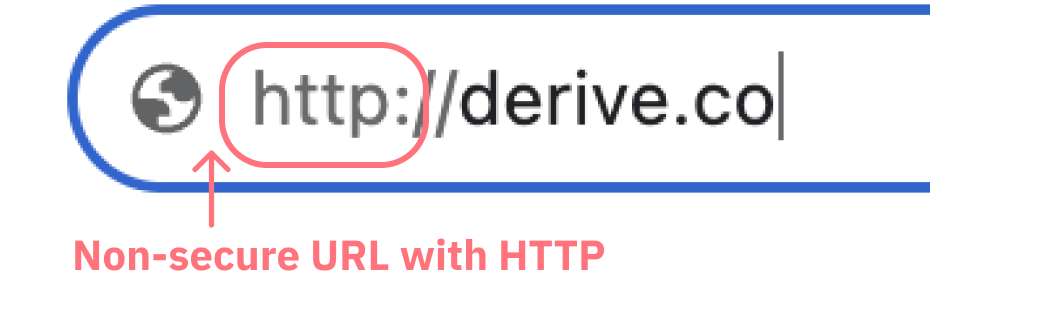
Some red flags of a phishing email:
- The sender’s email address doesn’t end with @deriv.com.
- Spelling and grammatical errors.
- They ask you to click suspicious links and attachments.
- Promises of easy money and huge profits.
- Requests to take immediate action like transferring your money to a bank account.

Check the account’s activity: misspelling of the account name, a high following-to-follow ratio, and emoji-loaded offers that sound too good to be true are red flags. We never ask for personal or bank details through social media or do giveaways or promotions. Verify the account with our official social media accounts listed at the bottom of our website.
No, your account safety is your sole responsibility. You can check some best practices to stay safe on the fraud prevention page.
No, Deriv doesn’t offer rewards for reporting scammers.
If you believe you have been phished or your credentials have been compromised, it's important to take these immediate actions to protect your online accounts and personal data:
- Change your password: Change the password for your account immediately. Use a strong, unique password, which can be generated with password management tools.
- Enable 2FA: If your account supports two-factor authentication (2FA), enable it. This provides an extra layer of security by requiring a second verification method (e.g., a code sent to your phone) to access your account.
- Check your accounts: Review all your other online accounts (email, social media, banking, etc.) to ensure they haven't been compromised as well. If you use the same password for multiple accounts, change those passwords too.
- Scan for viruses: Run a full system scan on your computer and any devices you used to access your account. Make sure your antivirus and anti-malware software is up to date.
- Monitor accounts: Keep a close eye on your accounts for any suspicious activity. This includes checking for unauthorised transactions, changes to account settings, or new login attempts.
- Notify Deriv: Contact our Customer Support team. Please have the scammer account’s information and evidence/screenshots ready so we can take appropriate action as soon as possible.
Here are a few steps you can take immediately when you discover unrecognised transactions:
- Notify Deriv: Contact our Customer Support team. Please have the scammer account’s information and evidence/screenshots ready so we can take appropriate action as soon as possible. Depending on the severity of the situation, we may temporarily freeze or close your account to prevent further unauthorised transactions.
- Change your Deriv password: Change the password for your account immediately. Use a strong, unique password, which can be generated with password management tools. If you use this same password for other accounts, make sure you change those, too.
- Monitor your accounts: Keep a close eye on your accounts for any suspicious activity. This includes checking for unauthorised transactions, changes to account settings, or new login attempts.