Help centre
Deriv works with several third-party providers to operate Amy and deliver its chat, AI-processing, knowledge-retrieval, logging, and verification functions.
AI processing
The text of your messages is processed by:
- OpenAI, with GPT-5 serving as the primary AI system.
- Google, through Google Gemini.
Data is transferred to these providers under appropriate contractual safeguards.
Chat platform
Intercom provides the platform that supports Amy’s chat interface. It stores conversation histories and contact information on its servers.
Supporting services
Deriv also uses:
- Weaviate for knowledge retrieval.
- Datadog for technical logging.
- Twilio for phone verification.
All third-party providers must comply with applicable data-protection laws and are subject to appropriate contractual safeguards.
For more information about third-party processors and international data transfers, see Deriv’s Privacy Policy.
The information Amy may process depends partly on whether you have a Deriv account.
Messages and attachments
Deriv may process:
- The messages you send to Amy.
- Amy’s responses.
- Any images or attachments you submit.
- Other information you choose to provide during the conversation.
Identity and contact information
This may include:
- Your name.
- Your email address.
- A unique conversation identifier created by Deriv’s customer service platform.
Deriv account information
When you have a Deriv account, Amy may access:
- Your Deriv user ID.
- Your trading account login IDs.
- Your country of residence.
- The brand or region associated with your account.
- Your account status and any applicable restrictions.
- Your wallet balance.
- Your KYC or identity-verification status.
- Your payment and transaction history.
Verification information
Amy may process your email-verification status. If you verify your identity using your phone, your phone number is used temporarily for the verification process.
Conversation information
Deriv may also process information about the conversation, including:
- Timestamps.
- The communication channel.
- Language.
- Conversation status.
- Tags.
- Priority indicators.
Information processed if you do not have a Deriv account
If you do not have a Deriv account, Amy can access only:
- Your messages, Amy’s responses, and any attachments.
- Your identity and contact information.
- Conversation information and metadata.
- Other information you voluntarily provide.
Amy cannot access Deriv account, trading, wallet, compliance, payment, or transaction information for users who do not have an account.
Sensitive personal information
Do not share health information, details of financial distress, or other sensitive information within the meaning of the UAE Federal Decree-Law No. 45 of 2021 on Personal Data Protection, referred to as the UAE PDPL.
Amy is not designed to handle sensitive personal information. If you submit such information, Deriv will process it only where necessary to respond to your query.
Why Deriv processes your data
If you have a Deriv account, Deriv uses the relevant personal data to answer questions about your account and its products and services. This enables Deriv to support you as a customer and provide services associated with your account.
If you do not have a Deriv account, Deriv uses the information you provide to answer general questions about its products and services. This processing is based on Deriv’s legitimate interests under the UAE PDPL.
Deriv may also record and review conversations with Amy to:
- Assess service quality.
- Train staff.
- Monitor compliance with legal and regulatory requirements.
- Improve Amy and other Deriv services.
This processing supports Deriv’s compliance, service-quality, and improvement activities and is based on its legitimate interests under the UAE PDPL.
Automated processing
Amy operates as a fully automated system. However, it does not make solely automated decisions that produce legal effects or similarly significant consequences for you.
Amy’s responses are provided for informational purposes only.
Amy is intended to help with general queries. Keep the following limitations in mind when using it:
- Amy cannot give professional advice. It does not provide financial, investment, tax, or legal advice, and its answers should not be relied on for these purposes.
- Its responses may contain errors or omissions. AI-generated answers can occasionally be inaccurate or incomplete. Independently verify any information that could affect an important decision.
- Some queries require human assistance. Speak with a member of the Deriv team when your matter is sensitive, complex, or requires personalised support.
You can type ‘live agent’ in the chat whenever you want to contact a support representative.
Amy is Deriv’s AI-powered chat assistant. It can answer general customer support questions, provide information about Deriv products and accounts, and help you navigate Deriv’s services.
Amy is a fully automated system, not a human support representative. It cannot:
- Provide financial, investment, tax, or legal advice.
- Place a transaction or order on your behalf.
- Modify or cancel a transaction or order.
Important: When you interact with Amy, you are interacting with a fully automated AI-powered system, not a human. To speak with a member of the Deriv team, type ‘live agent’ in the chat at any time.
When you use Amy, Deriv processes certain information to respond to your query and operate the service. This information should be read together with Deriv’s General Terms of Use and Privacy Policy.
The Privacy Policy also explains Deriv’s approach to international data transfers, third-party processors, data retention, and your data-protection rights.
For questions about this information or how Amy processes your data, contact Deriv’s Data Protection Officer.
Activating your Wallet is the first step to trading with real funds on Deriv. You'll go through a few short steps to provide your personal details, confirm your financial profile, and complete a trading suitability check. It only takes a few minutes to get set up and ready to make your first deposit.
1. Choose your Wallet currency
You’ll begin by selecting your preferred currency. Choose the currency you’d like to activate for your Wallet — AED or USD.

2. Complete your personal and address details
To set up your profile, you’ll need to provide:
- Your full name
- Your date of birth
- Your country of birth
Next, enter your residential address, including street, city, state or province, and P.O. Box (if applicable). Double-check to ensure everything is accurate before proceeding.

3. Provide your employment and tax information
Select your employment status:
- Employed
- Self-employed
- Unemployed
- Pensioner
If you’re employed, self-employed, or a pensioner, you’ll be asked if you're a tax resident outside the UAE:
- If yes, select your tax residence country and enter your TIN.
- If no, you can continue without providing tax details.
You’ll also be asked to provide your latest job title and employer name (if relevant).

4. Complete the financial assessment
You’ll need to share a few financial details to continue:
- Industry of employment – Choose the industry that best reflects your experience.
- Source of wealth – Select how your wealth has been accumulated (e.g., income/savings, business, inheritance).
- Financial standing – Indicate your:
- Net annual income
- Estimated net worth
- Monthly essential expenditure
- Education level – Select the highest qualification you’ve completed.

5. Complete the trading suitability assessment
You’ll also go through a trading suitability assessment and answer a few questions to assess whether leveraged trading is suitable for you:
- Your risk tolerance, ranging from conservative to high risk
- Understanding of trading risk (i.e., that you could lose 100% of funds used)
- Number of CFD trades in the past 12 months
- Your experience and knowledge of CFD trading

6. Share your main goal of opening an account
Indicate what you plan to use the account for — whether it’s savings or additional revenue, select the option that best matches your intention.

7. Review and accept the terms
Review the terms of use carefully, including important details about account regulations, risk warnings, and tax declarations. To proceed, you’ll need to agree to:
- Risk warning.
- FATCA declaration.
- Confirmation of whether you are a politically exposed person (PEP)
If you accept the terms and confirm your agreements, click Accept to proceed.

8. Review the trading suitability assessment report
After completing the assessment, you’ll see a screen with a decision based on your answers.
- If trading is considered suitable, you’ll see a message confirming that you can proceed.
- If trading is considered unsuitable, you’ll see a risk warning explaining that CFD trading may not be appropriate for your current knowledge, risk tolerance, or financial situation.
If you see the risk warning explaining that CFD trading may not be suitable for you, you'll then need to make a decision:
- Accept the outcome to continue.
- Reject the risk warning if you're not ready to proceed.
If you reject the warning, deposits and real-fund trading will be paused. You can regain access at any time by either retaking the assessment or accepting the risk warning. In the meantime, you’ll still be able to explore and use demo trading.

Wallet activated

If trading is considered suitable for you or if you accept the risk warning, congratulations! Your Wallet is successfully activated. Select Deposit to add funds right away (you’ll need to verify your identity first), or choose Maybe later if you prefer to make a deposit at another time.
If you click Maybe later, you’ll be taken back to the Home screen.
To ensure the security of your account, you’ll need to verify your identity. Follow our step-by-step guide to get started.
1. Confirm your personal details
Make sure the name and date of birth you’ve entered match the information on your official ID. If you spot any discrepancies, update your details before proceeding.

2.Select your country of residence
Choose your country of residence to determine how your personal data will be processed.
Select All countries except USA or United States of America, depending on your residence. You can tap Learn why we need this information for more details.
Check the box to confirm that you’ve read the Privacy Notice, then tap Continue.

3. Upload a selfie for a liveness check
As part of the verification process, you’ll need to upload a selfie. Follow the on-screen instructions to complete the liveness check:
- Move your head slowly to align within the on-screen circle.
- Ensure your face is well-lit and visible.
- Avoid wearing hats, glasses, or masks.

4. Prepare and upload your identity document
Choose your country of document issuance from the list, and select the type of document you’ll be uploading.
Once selected, tap Continue.

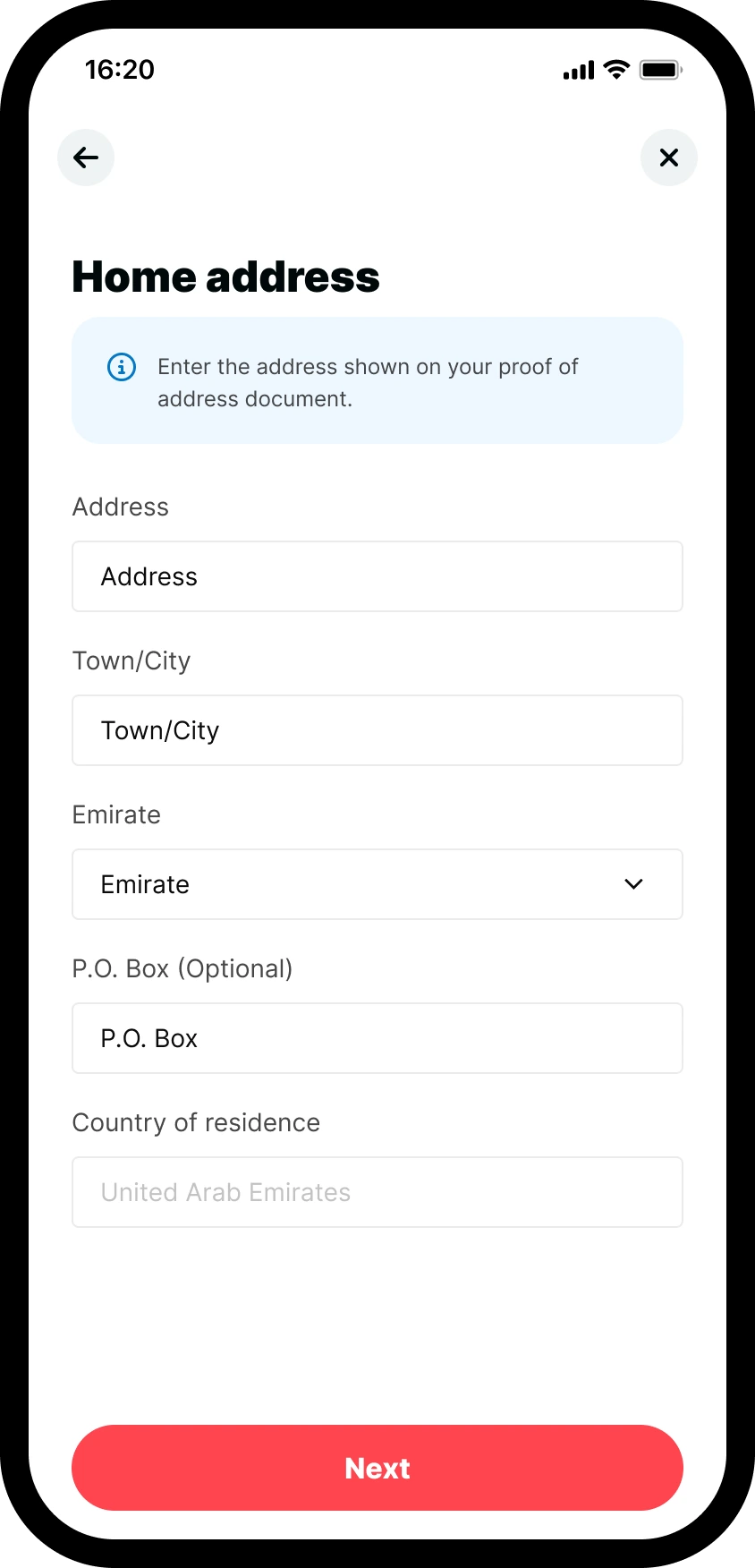
5. Confirm your home address
Enter your full residential address as shown on your proof of address document. Ensure that all details match exactly, including:
- Street address
- Town/City
- Emirate
- P.O. Box (if applicable)
- Country of residence
Once completed, tap Next to proceed.
6. Upload your proof of address document
You’ll be prompted to upload a proof of address document. Supported documents include:
- Valid ID document with address details
- Utility bills (electricity, water, gas)
- Bank statements
- Government-issued letters
Make sure the document meets these requirements:
- The document is dated within the last 3 months.
- The file format must be JPG, PNG, HEIC, WEBP, or PDF (max 50 MB).
- The document must be clear and readable.
- Screenshots, receipts, and medical bills are not accepted.
Tap Choose from your device to upload the document, then click Continue.

7.Final confirmation
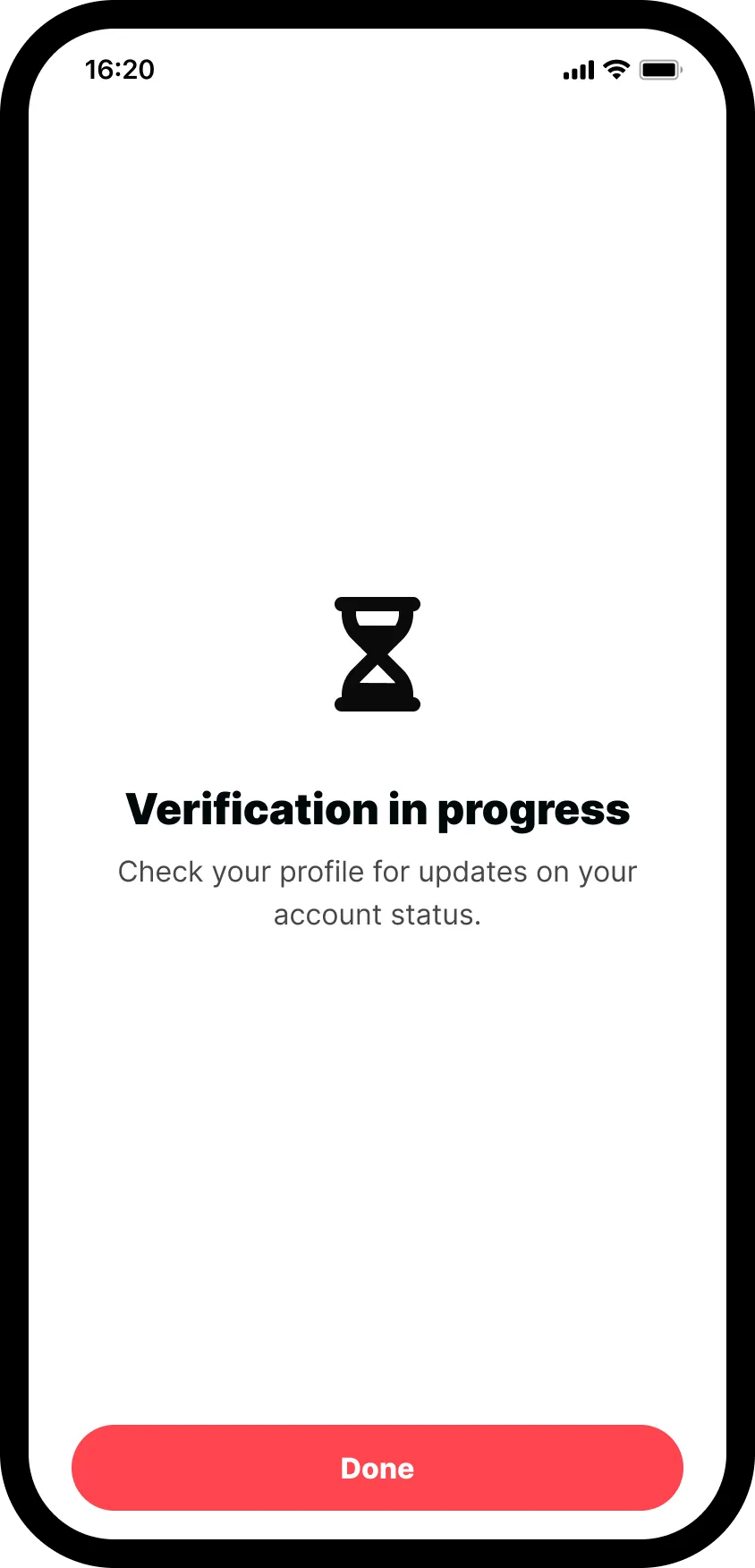
You’ll see a Verification in progress screen, indicating that your account verification is under review. You can check your Profile for updates on your account status.
Tap Done to return to the dashboard.
Identity verified
Once your verification is approved, you’ll be able to proceed with making deposits and activating your trading account.
We don't charge fees for deposits. However:
- Some payment providers may charge their own fees.
- Withdrawals may have fees depending on the payment method.
Always check the fee information displayed during your transaction.
You will need a separate account for the UAE platform, even if you already have a Deriv account. This is because Deriv in the UAE operates under a different licence issued by the Securities and Commodities Authority (SCA) and is exclusively available to UAE residents. If you meet the residency requirement, you can register for a new account specifically for the UAE platform.
No, our services are only available to residents of the UAE. This is a regulatory requirement for our SCA license.
Verification typically completes in just a few minutes once you submit your documents. You can check for updates in your account profile or watch for email notifications confirming your status. If any issues arise with your submitted documents, we will get in touch with instructions on what to do next. You can also contact our support team at any time for additional guidance.
To avoid delays, ensure your proof of identity and proof of address documents are clear, in colour, and unedited. Screenshots, receipts, and medical bills are not accepted as proof of address.
Before you can deposit funds, we request identity verification to:
- Comply with regulatory requirements set by the UAE Securities and Commodities Authority (SCA).
- Protect against fraud and unauthorised account access.
- Ensure account security and protect your funds.
- Prevent money laundering and other financial crimes.
- Confirm you meet the eligibility requirements.
The verification process involves providing proof of identity (a selfie/liveness check and an official ID document) and proof of address (such as a valid ID with address details, utility bill, bank statement, or government-issued letter dated within the last 3 months).
Most verifications are processed within minutes, and our support team is available to assist if you encounter any issues with document submission.
If you encounter a technical issue while trading:
- Take screenshots of the error or issue.
- Note down the time and details of what happened.
- Check your internet connection.
- You can also try refreshing the page or restarting the application, where applicable.
- Contact customer support through live chat for immediate assistance.
- Provide all relevant details to help resolve your issue quickly.
You can reach our team through:
- Live chat on our website for immediate assistance.
- You can also speak with our Customer Support team 24/7.
- Email support@deriv.com for more detailed inquiries.
Support is available in both English and Arabic.
We protect our client funds through:
- Segregated accounts: Client funds are kept separate from company operational funds.
- Regulatory compliance: Operating under SCA regulation with strict financial standards.
- Secure banking relationships: Working with established financial institutions.
- Regular audits: Financial practices are regularly reviewed.
- Negative balance protection: Ensuring clients don't lose more than they deposit.
We employ strong security measures:
- Email verification for login.
- Advanced encryption for data protection.
- Identity verification to prevent unauthorised access.
- Regular security audits and updates.
- Secure payment processing.
- Advanced identity verification with liveness check.
If you haven't received your verification code:
- Check your spam or junk folder.
- Wait 60 seconds and click "Resend code".
- Make sure your email address is entered correctly.
- If you enter an incorrect code three times, you'll need to wait 10 minutes before requesting another code.
- If you still don't receive the code, contact customer support.
Yes, customer support is available in English and Arabic.
You can trade over 590 assets on Deriv across these major financial markets:
- Forex (major, minor, and exotic currency pairs)
- Stocks (leading global companies)
- Stock Indices (major indices from around the world)
- Commodities (precious metals, base metals, and energies)
- Cryptocurrencies (tradable 24/7, including Bitcoin and popular altcoins)
- ETFs (track a variety of sectors and benchmarks)
Deriv does not charge any commissions or impose hidden fees on your trades — both MT5 account types (Standard and Swap-free) have zero commission charges.
However, the following costs apply when trading on Deriv:
- Trading spreads (from 0.6 pips for Standard accounts and 2.2 pips for Swap-free accounts)
- Administration fee for MT5 Swap-free accounts when positions are held for longer than five days
Yes, Deriv offers a demo MT5 account with AED 10,000 virtual funds, letting you test strategies in real-time market conditions without risking your own capital. You can access this demo account even before completing verification or activating a Wallet.
The demo account provides full access to the MT5 platform, offering the same trading instruments and features as a real account. With it, you can:
- Test the platform's functionality and user interface
- Practise trading strategies without financial risk
- Explore the various financial markets offered, including Forex, Stocks, Stock Indices, Commodities, Cryptocurrencies, and ETFs
- Familiarise yourself with MT5's analysis tools and indicators
This allows you to familiarise yourself with the MT5 platform and test trading strategies risk-free before trading with real funds.
Yes, your email can be changed. To ensure your account stays protected, we handle email updates through live chat only. Once you reach out, our support team will verify your identity and assist you with updating your registered email address smoothly.
If your verification documents are rejected, you’ll receive an email letting you know that the submission was unsuccessful. Common issues include:
- Blurry or low-quality images
- Mismatched names or addresses between your profile and documents
- Expired or unsupported document types
You’ll be able to re-upload the corrected documents securely through your account. If you’re not able to re-upload your documents, please contact us via live chat. Our Customer Support team will help you continue with the verification process.
Verification is typically completed within minutes, provided your documents meet all the requirements. For the fastest approval:
- Ensure your ID and address documents are legible and not expired
- Make sure your selfie matches your ID
- Check that the names and dates match your profile details
If we need more information or something’s unclear, we’ll email you with what to update or resubmit. Once verified, you can start depositing and trading right away.
Yes, you can open multiple MT5 trading accounts under a single Deriv profile, including both a Standard and a Swap-free account. These accounts can be used for different strategies.
However, you’re only allowed to have one Wallet, which can be in either AED or USD, depending on your preference. All your MT5 accounts — Standard or Swap-free — will be linked to this single Wallet and share the same base currency.
Opening a Deriv trading account is completely free, with no monthly or registration charges. We also absorb all third-party fees on your deposits and withdrawals.
However, please note that for the MT5 Swap-free account, an administration fee is charged if you hold positions for longer than five days. This fee is separate from the account opening process, which remains completely free.
To withdraw funds, you'll need to first verify your identity. Then, enter your external payment details, specify the amount, and confirm the transaction.
You'll need to transfer the funds from your MT5 trading account to your Wallet to withdraw your money.
You can fund your Deriv Wallet using a variety of secure payment methods:
- Credit/debit cards: Visa and Mastercard
- E-wallets: Skrill and Neteller
- Apple Pay
Each method supports instant processing, so your funds appear immediately. After completing your identity verification, simply go to your Wallet, tap Deposit, choose your preferred method, and follow the on-screen instructions.
Minimum deposit:
- AED accounts: AED 15 minimum
- USD accounts: USD 5 minimum
To start trading on Deriv MT5, you'll need to activate a real MT5 account, set up a password, and transfer funds from your Wallet.
Activating your real MT5 account
1. Choose your preferred account type
When prompted to activate a real account, you’ll see two options: Standard or Swap-free.
The Standard account offers competitive spreads and is ideal for short-term trading. If you prefer to keep positions open overnight without incurring swap fees, the Swap-free account may suit you better. Tap on your preferred account to continue.

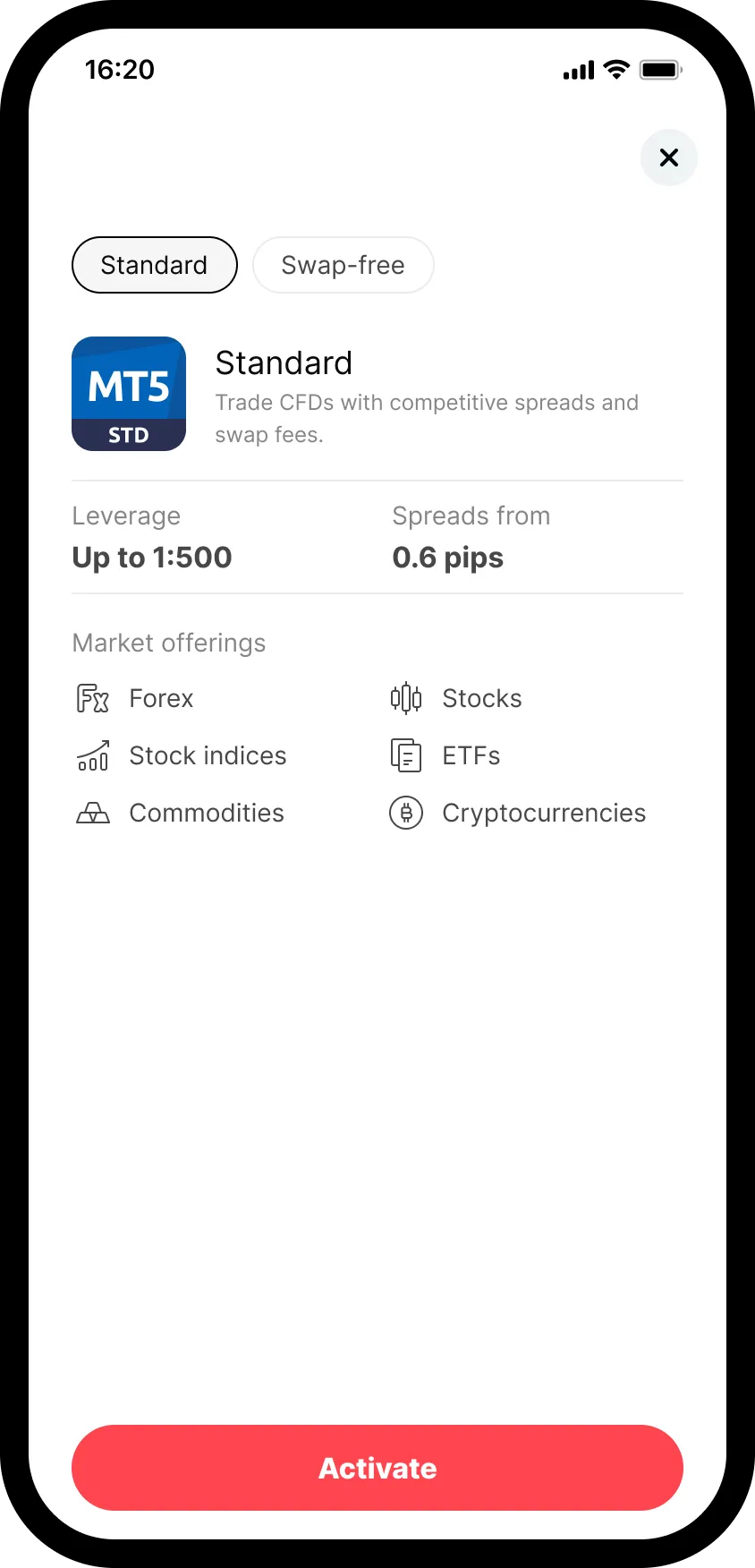
2. Review the account details and activate
Next, you’ll see more information about the account, such as leverage, spreads, and available markets. If everything looks right, tap Activate at the bottom of the screen.
3. Set your MT5 password
You’ll now be asked to create a password for your MT5 account. This password must be 8–16 characters long and include at least one uppercase letter, one lowercase letter, one number, and one special character.
Re-enter your password to confirm, tick the box to accept the terms and conditions, then tap Confirm.

Your MT5 account is ready to go
After activating your real Deriv MT5 account, you’ll be prompted to transfer funds directly from your Wallet. You can also choose Maybe later if you’d prefer to come back to it when you’re ready.

Transferring funds to your real MT5 account
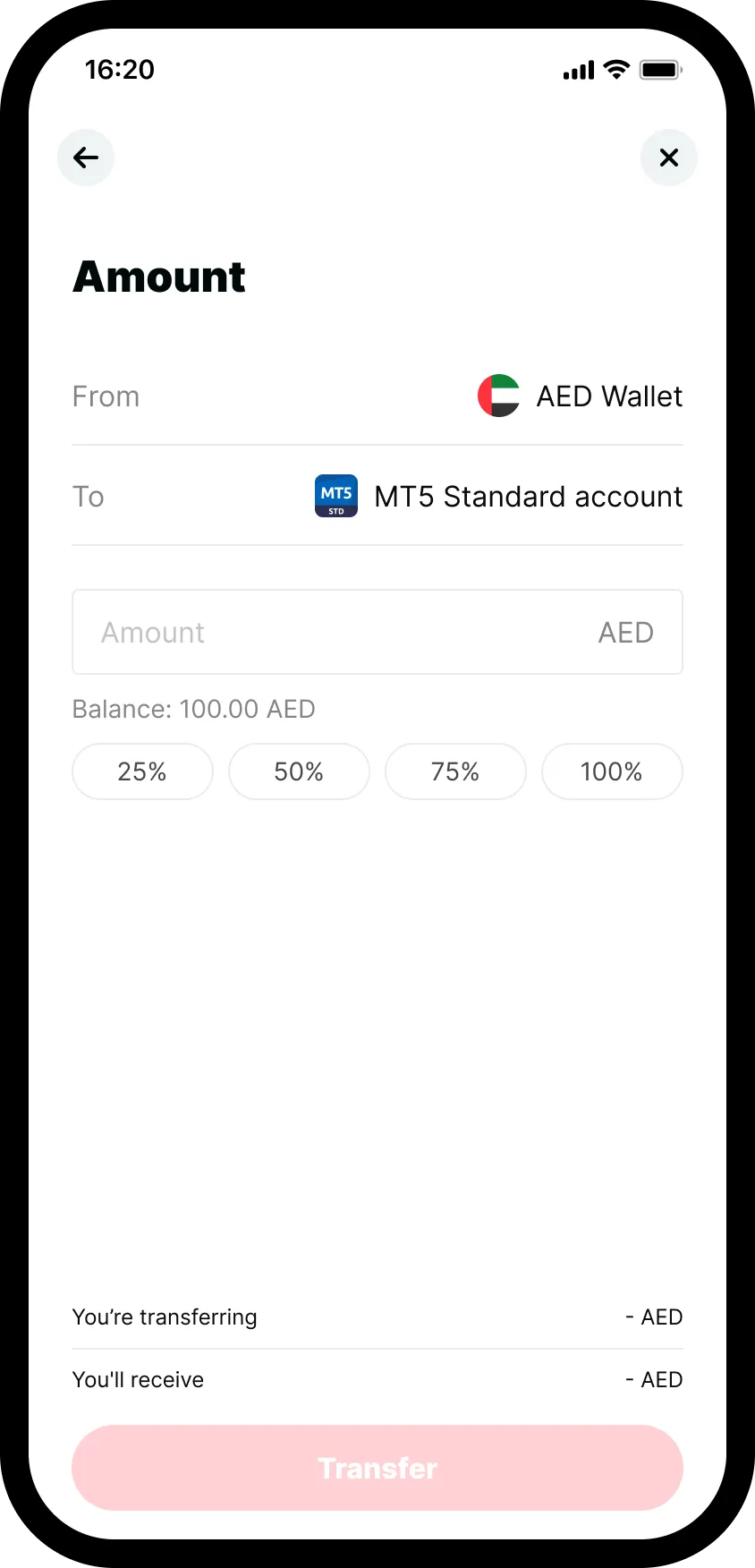
1. Enter the transfer amount
After tapping Transfer, you’ll be able to see your Wallet balance. Enter the amount you wish to transfer. You’ll also see the transfer fee and the final amount you’ll receive in your MT5 account.
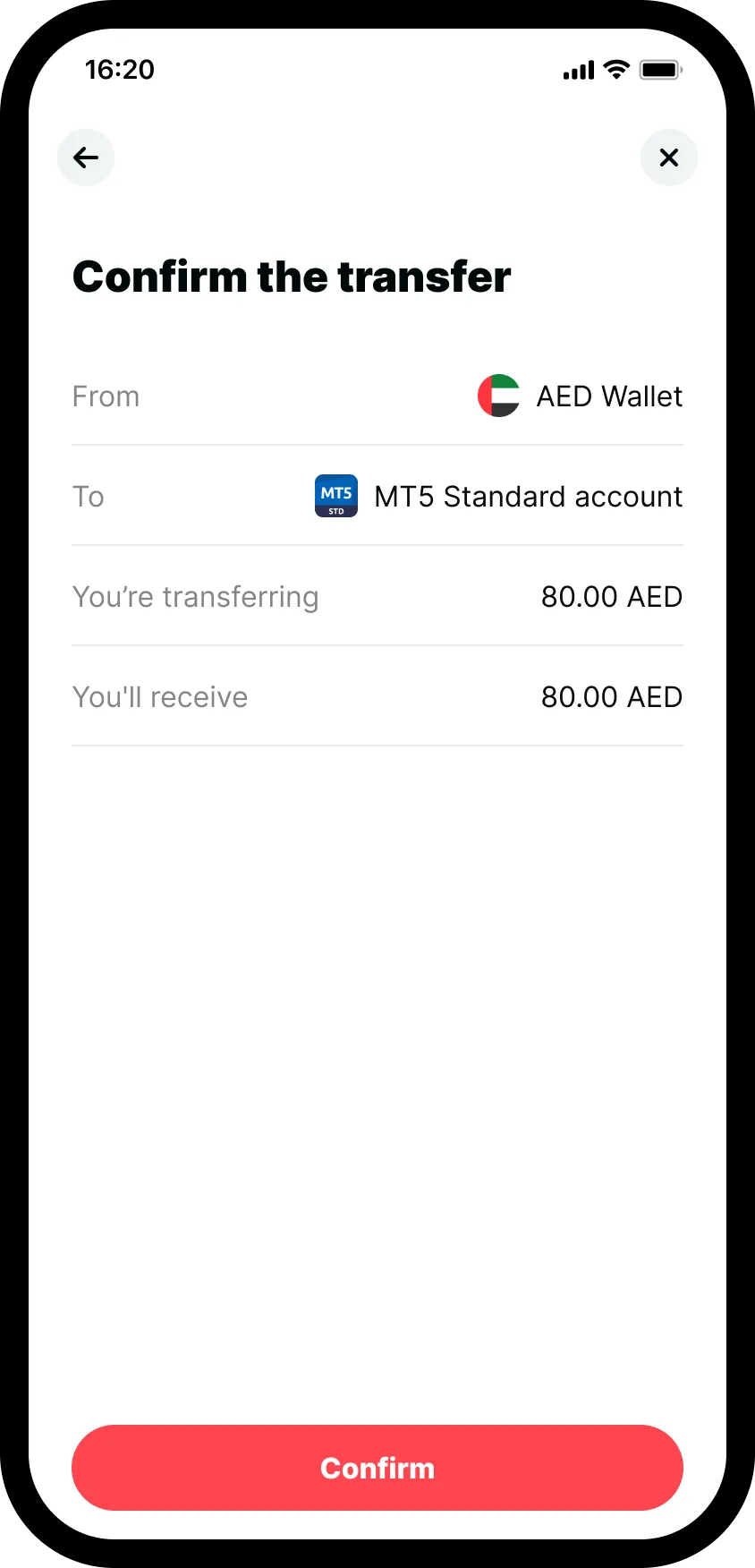
2. Confirm the transfer
Review the transfer details carefully — including the amount you’re sending, any applicable fees, and the amount that will be credited.
If everything looks correct, tap Confirm to proceed.
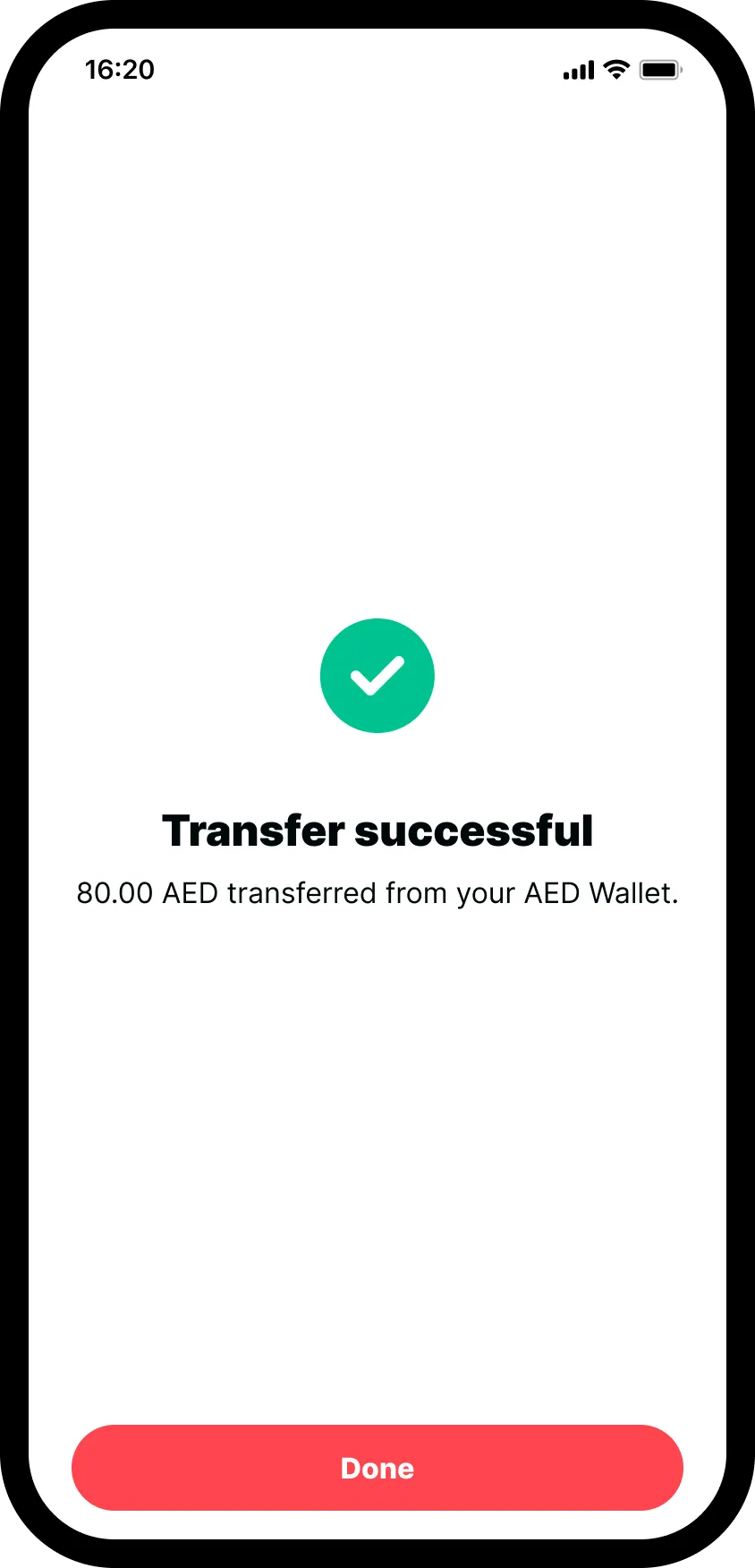
Transfer successful
Once confirmed, you’ll see a success message letting you know that the transfer is complete. Tap Done to return to your dashboard and start trading.
Leverage varies by instrument, with up to:
- 1:1000 for Forex major and minor pairs
- 1:200 for Forex exotic pairs (available only in the MT5 Standard account)
- 1:10 for Stocks and ETFs
- 1:400 for Stock Indices
- 1:800 for Commodities
- 1:800 for Cryptocurrencies
Deriv provides two MT5 account types:
- MT5 Standard – our all-round account with leverage up to 1 : 1000, spreads from 0.6 pips, and the complete product range:
- 50+ Forex pairs (major, minor, exotic)
- 50+ US & EU Stocks, 19 global Stock Indices
- 13+ Commodities (metals, energies, base metals)
- 25+ Cryptocurrencies traded 24/7
- 30+ ETFs for diversified exposure
- MT5 Swap-free – designed for traders who don’t wish to pay overnight financing. You still get up to 1 : 1000 leverage, but instruments are limited to swap-free assets (for example, 39 Forex pairs and oil, but no natural gas). Spreads start at 2.2 pips, with no swaps on positions you keep open.
Both accounts don’t charge entry fees, exit fees, or commissions. Simply activate the type that fits your needs once your Wallet is funded.
To open a real-money account with Deriv, you’ll need to complete identity verification by submitting the following documents:
- Selfie (liveness check) – You’ll be prompted to take a selfie using your device camera.
- Proof of identity (POI) – This must be a valid passport, UAE government-issued ID such as driving licence or residence visa, or a national ID of a GCC (Gulf Cooperation Council) country. The name and birthdate must exactly match the details on your Deriv profile.
- Proof of address (POA) – Accepted documents include:
- Valid ID document with address details
- Utility bill (electricity, water, gas)
- Bank statement
- Government-issued letters
All documents must be clear, legible, and show details that match your Deriv profile. Proof of address must be dated within the last 3 months and include your full name and residential address.
Deposits into your Wallet are typically instant, whether you use a credit/debit card (Visa or Mastercard) or e-wallets like Skrill and Neteller. The moment your payment is confirmed, the funds will appear in your Wallet balance.
For withdrawals, processing time can vary depending on the payment method you choose. In most cases, withdrawals are also completed quickly, but some providers may take a bit longer to reflect the funds in your account. To ensure security, withdrawals are only available after a quick identity confirmation.
Sign up for a Deriv account to get access to 200+ trading instruments.
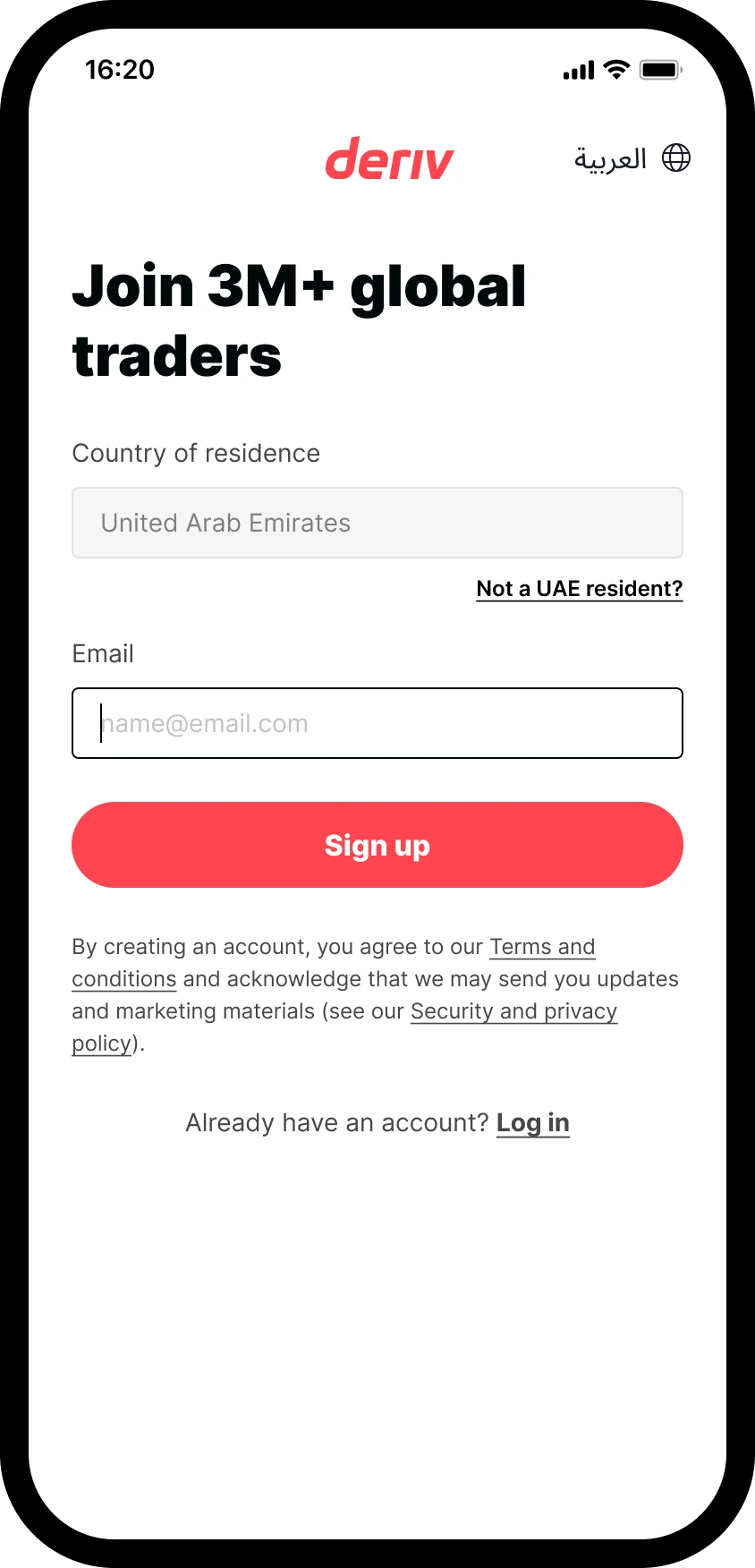
1. Start the sign-up process
Visit the Deriv website and click on Open account.

2. Enter your email address
This is the email that you will use to log in to your Deriv account. Make sure your email address is valid, as this will be used for important account communications.
3.Verify your email address
We’ll send a 6-digit verification code to your email to verify your email. Enter the code to confirm and continue.
- If you don’t receive the code, you can ask for a new one after 60 seconds.
- If you enter an incorrect code three times, you’ll need to wait 10 minutes before requesting another verification code.
.webp)
Welcome to Deriv!
Once you’ve finalised your registration, you’ll be prompted to activate a Wallet. You can choose to skip this step and try demo trading immediately.
To unlock full access to your account, continue to activate your Wallet.
If you decide to skip this step and try demo, you’ll be taken to your client portal where you can:
- Try demo trading with a demo MT5 account and AED 10,000 in virtual funds.
- Activate a Wallet to make a deposit.




Contact support

