ⴱⵢⵢⵉⴷ ⵖⵔ ⵡⴰⴳⴳⵓⵔ ⴰⵎⵇⵇⵕⴰⵏ

ⵎⴰ ⵜⴳⴰ ⵉⵎⵉⵔⵏ ⵏ ⵜⵏⴼⵍⵉⵜ ⴷ ⵎⴰⵏⵉⵜ ⵉⵇⵇⴰⵏ ⴰⴷ ⵓⵔ ⵜⴱⴹⵓⵎ ⵜⵉⵏⵏ ⴽⵔⴰⵜⵜ

5
ⵜⵓⵙⵏⴰ ⵏ ⵓⵙⵖⵔ
ⴰⵎⵙⴰⵍ ⵏ ⵜⵉⵍⵉⴼⵓⵏⵜ ⵜⵜⵓⵃⵍⴰ ⴷ ⵜⴰⵎⴰⵏⵓⵏⵜ ⵏ ⵓⵔⵎⵣ ⵏ ⵓⵙⵏⵓⵍⴼⵓ, ⵉⵎⵓⵔⵔⴰⵏ ⵏ ⵜⵙⵍⴰⵎⵜ ⴷ ⵜⴰⴷⵉⴷⵜ ⵏ ⵜⵖⵔⵉ ⵜⵜⵓⵙⵙⵏⵏⴷⵜ, ⵉⵙⵎⴰⵍⵏ ⴰⵙⵎⵔⵙ ⵉⵎⴰⵏⴰⵏ ⵏ ⵉⵔⵎⵣ ⵉⵎⴰⵏⴰⵏ.

ⵉⵎⵉⵔⵏ ⵏ ⵜⵏⴼⵍⵉⵜ ⵜⵜⵡⴰⵔⴰⵏ ⵖⴰⵙ ⴰⴷ ⵙⵙⵏⵎ ⵎⵔ ⵏⵏⵉⵜ ⵜⴳⴰⵎ ⵜⴰⵎⵙⵍⴰⵢⵜ ⵜⴰⵎⵇⵇⵔⴰⵏⵜ—ⴰⵎⵎ ⴽⵛⵎ, ⴱⴹⵓ ⵏ ⵜⴰⵡⵍⴼⵉⵏ ⵏ ⵓⵙⵔⵖ ⵏⵖ ⵙⵙⵏⵜⵎ ⵏ two-factor authentication (2FA)—ⵜⵜⵓⵙⵙⵓⴼⵖ ⵙ ⵡⴰⵔⴰ ⵏⵏⵓⵏ. ⵉⵎⵉⵔⵏ ⴰⴷ ⵜⵣⵎⵔ ⴰⴷ ⵜⴼⵔⵏⵉ ⴰⵍⵓⵔ ⵖⵔ ⵓⵎⵎⴰⵙ ⵏⵏⵓⵏ ⵏ Deriv, ⴰⵀⵍ ⵉⵇⵇⴰⵏ ⴰⴷ ⵜⴷⵓⵎ ⵜⵜⴰⵢⵏⵉⵏⵜ. ⴰⵙⵏⵜⵍ ⴰⴷ ⵉⵙⵙⵏⵜⵍ ⵎⴰ ⵜⴳⴰ ⵉⵎⵉⵔⵏ ⵏ ⵜⵏⴼⵍⵉⵜ, ⵎⴰⵏⵉⵜ ⵜⵜⵓⵙⵙⵓⵎⵔⵏⵜ ⴷ ⵎⴰⵎⵏⴽ ⴰⴷ ⵜⵜⵓⵙⵙⵓⵙⵎⵏⵜ ⵙ ⵓⵎⴰⵏ.

ⴰⵙⵏⵜⵍ ⴰⵙⵓⵔⵉⴼ

  • ⵉⵎⵉⵔⵏ ⵏ ⵜⵏⴼⵍⵉⵜ ⵜⵔⴰⵏⵜ ⴰⵙⵏⵇⴰⴷ ⵜⴰⵎⴰⵢⵏⵓⵜ ⴷⴰⵔ ⴰⵙⵎⵙⵍⵉ ⵏ ⵜⵎⵙⵍⴰⵢⵉⵏ ⵏ ⵓⵎⵎⴰⵙ ⵉⵜⵜⵓⵎⵓⵔⵏ.
  • ⵜⵣⵎⵔⵏⵜ ⴰⴷ ⴳⵏⵜ ⵉⵎⵉⵔⵏ ⵏ ⵓⵙⵔⵖ ⵉⵢⵢⴰⵏ ⵏ ⵜⵉⵔⴰ, ⵉⵎⵉⵔⵏ ⵏ authenticator app, ⵉⵎⵉⵔⵏ ⵏ ⵓⵙⵏⴼⵍ ⵏ ⵓⵙⵔⵖ ⴷ ⵉⵎⵉⵔⵏ ⵏ ⵓⵙⵏⴼⵍ.
  • ⵙⴽⵛⵎⵜ ⴰⵎⵉⵔ ⵙ ⵓⵎⵓⵔⵏⵉⵏⵏⵓⵏ ⵖⴰⵙ ⴳ ⵓⵙⵉⵜ ⵏⵖ ⵜⵙⵏⴰⵔⵜ ⵏ Deriv ⵜⴰⵏⴰⵡⴰⵏⵜ ⴳ ⵜⵉⵔⴰ ⵉⵜⵜⵓⴼⵔⵏⵏ.
  • ⵓⵔ ⵙⵙⵓⵎⵔⵜ, ⵓⵔ ⵙⵙⵖⵔⵜ, ⵓⵔ ⵙⵙⵉⵏⴼⵜ, ⵓⵔ ⵙⵙⵓⴼⵖⵜ ⵜⴰⵡⵍⴼⵉⵏ ⵏ ⵓⵙⵏⵓⴼⵍ ⵏⵖ ⵜⵙⵙⵓⵎⵎⵜ ⴰⵎⵉⵔ ⵏ ⵜⵏⴼⵍⵉⵜ.
  • ⵎⴰ ⵜⴱⴹⵓⵎ ⴰⵎⵉⵔ ⵙ ⵓⵎⵉⵙ, ⵙⵏⴼⵍⵜ ⴰⵎⵎⴰⵙ ⵏⵏⵓⵏ ⵙ ⵜⴰⵙⵔⵉⵔⵜ ⵙ ⵜⵉⵖⵔⵉⵡⵉⵏ ⵜⴰⵏⴰⵡⴰⵏⵉⵏ ⵏ Deriv.

ⵎⴰ ⵜⴳⴰ ⵉⵎⵉⵔⵏ ⵏ ⵜⵏⴼⵍⵉⵜ?

ⴰⵎⵉⵔ ⵏ ⵜⵏⴼⵍⵉⵜ ⵉⴳⴰ ⴰⵙⵙⵉⵏⴰⵖ ⵉⵜⵜⵓⵙⵙⵎⵔⴰⵙⵏ ⴰⴷ ⵉⵙⵙⵏⵜⵍ ⵎⵔ ⴽⵛⵎ ⵏⵖ ⵜⴰⵎⵙⵍⴰⵢⵜ ⵏ ⵓⵎⵎⴰⵙ ⵜⵜⵓⵎⵔⵏ ⵙⵖⵓⵔⵏⵏⵓⵏ. ⵜⵓⵔⴰ ⵏ ⵜⵓⵖⵔⵉⵙⵜ ⵏ ⵓⵙⵔⵖ, ⴽⵔⴰ ⵏ ⵉⵎⵉⵔⵏ ⵏ ⵜⵏⴼⵍⵉⵜ ⴳⴰⵏ ⵉⵏⵣⵡⵉⵏ: ⵜⵣⵎⵔⵏⵜ ⴰⴷ ⵙⵎⵔⵏⵜ ⴷⴰⵔ ⵜⵓⵖⵔⵉⵙⵜ ⵜⴰⵎⵥⵥⵉⵢⵜ ⵏⵖ ⴰⴷ ⵙⵡⵓⵔⵏⵜ ⵜⵉⵍⵍⵉ ⵏ ⵜⵉⴽⴽⴰⵍ ⵢⴰⵜ.

ⵜⵣⵎⵔⵎ ⴰⴷ ⵜⴼⴽⵎ ⴰⵎⵉⵔ ⵏ ⵜⵏⴼⵍⵉⵜ ⵎⴰ:

  • ⵜⴽⵛⵎⵎ ⵙⵖ ⵜⵓⵙⵉⵔⵜ ⵏⵖ ⴰⵎⵙⵙⵓⵏ ⴰⵎⴰⵢⵏⵓ
  • ⵜⵙⵙⵓⴼⵖⵎ ⵏⵖ ⵜⵙⵎⵔⵙⵎ 2FA
  • ⵜⵙⵏⴼⵍⵎ ⵏⵖ ⵜⵙⵏⴼⵍⵎ ⴰⵎⵉⵔ ⵏ ⵓⵙⵔⵖ ⵙ ⵓⵎⴰⵢⵏⵓ
  • ⵜⵙⵏⵇⴰⴷⵎ ⵜⴰⵎⵙⵍⴰⵢⵜ ⵏ ⵜⵏⴼⵍⵉⵜ ⵏ ⵓⵎⵎⴰⵙ ⵉⵜⵜⵓⵎⵓⵔⵏ
  • ⵜⵙⵏⴼⵍⵎ ⴰⵙⵎⵓⵏ ⵖⵔ ⵓⵎⵎⴰⵙ

ⵉⵎⵉⵔⵏ ⵏ ⵜⵏⴼⵍⵉⵜ ⵉⵙⵍⴰⵏ ⵅⴼ ⵓⵙⵏⵇⴰⴷ ⵜⴰⵎⴰⵢⵏⵓⵜ. ⵙⵍⴰⵏ ⵎⵔ ⵢⴼⵏⴰ ⵢⴰⵏ ⴰⵙⵔⵖ, ⵓⵔ ⵉⵣⵎⵔ ⴰⴷ ⵉⵙⵎⵙⵍⵉ ⵜⴰⵎⵙⵍⴰⵢⵜ ⵜⵜⵓⵎⵓⵔⵏ ⴱⵍⴰ ⴰⵎⵉⵔ ⵉⵎⵓⵏⵏ.

ⵉⵏⴰⵡⵏ ⵉⵎⵉⵔⵏ ⵏ ⵜⵏⴼⵍⵉⵜ

ⵉⵙⵔⵖⵏ ⵏ ⵜⵉⴽⴽⴰⵍ ⵢⴰⵜ (OTPs) ⴳⴰⵏ ⵉⵎⵉⵔⵏ ⵉⵏⵣⵡⵉⵏ ⵉⵜⵜⵓⵣⵏⵏ ⵖⵔ ⵓⵏⵙⴰ ⵏ ⵓⵎⴰⵢⵍ ⵏⵖ ⵓⵎⴹⴰⵏ ⵏ ⵓⵜⵍⴼⵓⵏ ⵉⵜⵜⵓⵙⵙⴽⴰⵏ. ⵜⵙⵙⵏⵓⵜⵜⵜ ⴰⴷ ⵜⵙⵏⵇⴰⴷ ⵎⵔ ⵜⵣⵎⵔⵎ ⴰⴷ ⵜⴽⵛⵎⵎ ⵖⵔ ⵜⵖⵓⵔⵉ ⵏ ⵓⵏⵙⴰ ⵉⵜⵜⵓⵔⴱⵓⵏ ⵙ ⵓⵎⵎⴰⵙ.

ⵉⵎⵉⵔⵏ ⵏ authenticator app ⴳⴰⵏ ⵉⵎⵉⵔⵏ ⵉⵎⵥⵥⵉⵢⵏ ⵉⵏⵣⵡⵉⵏ ⵙ ⵜⵎⵓⵖⵍⵉ ⵏ ⵓⵡⴰⴽⴰⵍ ⵉⵜⵜⵓⵙⵙⵓⴼⵖⵏ ⴳ authenticator app. ⵜⵜⵓⵙⵎⵔⴰⵙⵏⵜ ⵙ ⵓⵟⵟⵓⵏ ⵉ 2FA ⴷ ⵜⵜⵙⵏⴼⵍⵏⵜ ⴰⵎⵙⴰⵡⴰⵍ.

ⵉⵎⵉⵔⵏ ⵏ ⵓⵙⵏⴼⵍ ⵏ ⵓⵙⵔⵖ ⵜⵙⵙⵏⵓⵜⵜⵜ ⴰⴷ ⵜⵙⵏⵇⴰⴷ ⵎⵔ ⵜⵓⵔⴰ ⵏ ⵓⵙⵏⴼⵍ ⵏ ⵓⵙⵔⵖ ⵜⵜⵓⵔⵉⵏⵜ. ⴰⵀⵍ ⵜⵜⵉⴳⵏⵜ ⵜⵉⵏⵏ ⵉⵎⵓⵖⵏ ⵅⴼ ⵜⵏⴼⵍⵉⵜ ⵅⴼ ⵓⵙⵓⵍⵉ ⵏⵏⵙⵏⵜ ⴳ ⵓⵙⵏⴼⵍ ⵏ ⵓⵙⵔⵖ ⴰⵎⴰⵢⵏⵓ.

ⵉⵎⵉⵔⵏ ⵏ ⵓⵙⵎⵓⵏ ⵏⵖ ⵏ ⵜⵉⴷⵓⵍⵉⵏ ⴳⴰⵏ ⵉⵎⵉⵔⵏ ⵏ ⵜⵙⵙⵓⵔⴰⵏ ⵉⵜⵜⵓⵙⵙⵓⴼⵖⵏ ⵎⵉ ⵜⵙⵙⵏⵎ 2FA. ⵜⵣⵎⵔⵏⵜ ⴰⴷ ⵜⵏⴼⵏ ⴰⵙⵎⵓⵏ ⵎⵔ ⵜⵙⵙⵓⴼⵖⵎ ⴰⵎⵙⵙⵓⵏ ⵏ authenticator, ⴰⵀⵍ ⵉⵇⵇⴰⵏ ⴰⴷ ⵜⵜⵓⴼⴰⵏ ⴳ ⵓⵎⴰⵏ ⴷ ⴰⴷ ⵜⵜⵓⵎⵓⵔⵏⵜ ⴰⵎⵎ ⵉⵙⵔⵖⵏ.
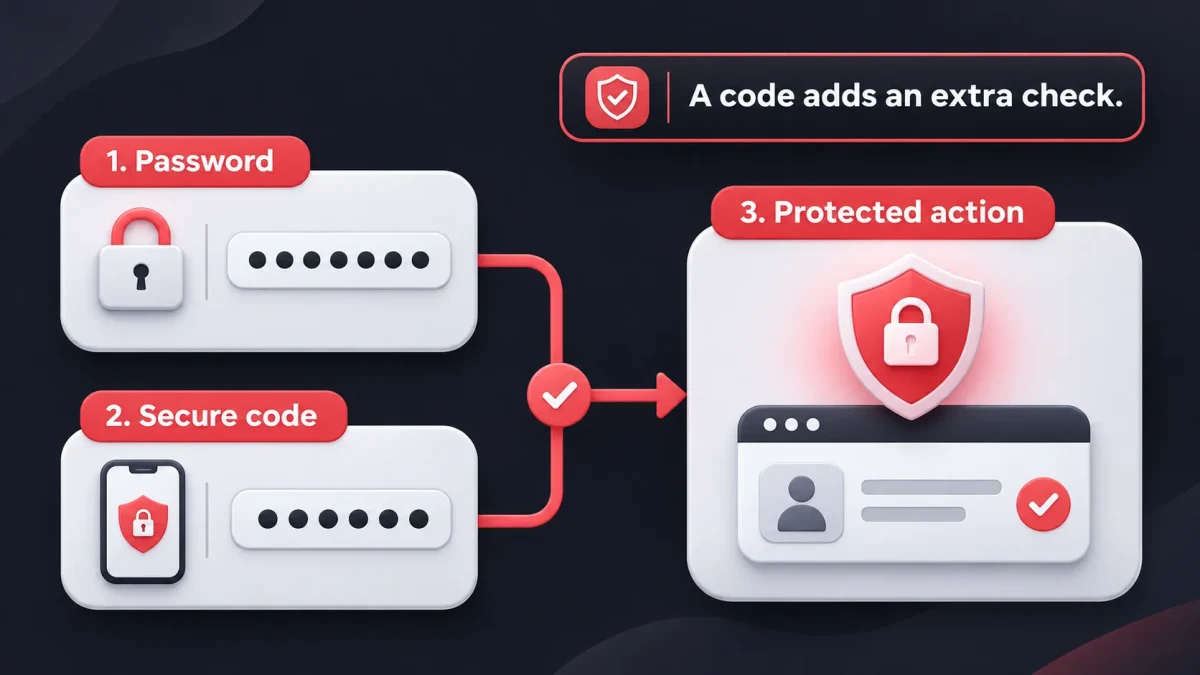
Secure codes help confirm that an important action—such as signing in, changing a password or setting up two-factor authentication (2FA)—is being completed by you. Because these codes can help protect access to your Deriv account, they should always remain private. This guide explains what secure codes are, why they are needed and how to handle them safely. Quick summary Secure codes add an extra check before sensitive account actions can be completed. They can include one-time passwords, authenticator-app codes, password-reset codes and recovery codes. Enter a code yourself only in the official Deriv website or app during an expected step. Never send, read aloud, forward, screenshot or post a secure code. If you accidentally share a code, secure your account promptly through official Deriv channels. What are secure codes? A secure code is a credential used to help confirm that a login or account action is authorised by you. Unlike a password, many secure codes are temporary: they may expire after a short period or work only once. You may encounter a secure code when you: Sign in from a new device or browser Turn on or use 2FA Change or reset a password Confirm a sensitive account-security action Recover access to an account Secure codes are useful because they add another layer of verification. Even if someone discovers a password, they may be unable to complete a protected action without the additional code. Common types of secure codes One-time passwords (OTPs) are temporary codes sent to a registered email address or phone number. They help verify that you can access the contact method linked to the account. Authenticator-app codes are short, time-limited codes generated in an authenticator app. They are commonly used for 2FA and change regularly. Password-reset codes help confirm that a request to reset a password is authorised. They are especially sensitive because they can be part of a process to create a new password. Recovery or backup codes are emergency codes created when setting up 2FA. They may help restore access if you lose an authenticator device, so they must be stored securely and treated like passwords.   Alt text: Diagram shows a password and a secure code as separate requirements before a protected account action can proceed. Why secure codes are needed Passwords can be guessed, reused or exposed through a data breach or phishing attempt. A secure code helps reduce the risk that a password alone can be used to access an account or make a sensitive change. For example, when you change a Deriv password from your profile, Deriv may send a one-time password to your registered email to help verify the request. You enter that OTP yourself as part of the official process, then set the new password.  This extra step is not a guarantee against every risk, but it creates an important barrier. It confirms that the person making the request has access to the required verification method at that moment. Codes are for you to enter, not to give away A secure code is not a piece of information to share with another person. It is an instruction for you to complete a specific security step yourself. Keep this distinction in mind: Safe action Unsafe action Entering a code yourself in the official Deriv website or app Sending a code in a chat, email or social-media message Using a code during a step you started Giving a code to someone who contacted you unexpectedly Storing recovery codes in a protected location Saving recovery codes in an unprotected note or screenshot Opening Deriv directly before entering a code Following an unverified link to enter a code   When it is safe to enter a code Enter a secure code only when all of these conditions apply: You started the action yourself. You are using the official Deriv website or app. You expected the verification step. The code is being entered into the relevant secure field—not sent to a person. For example, if you select Password in your Deriv profile and request a password change, an OTP sent to your registered email can be part of that expected process. The code should be entered only in the official password-change flow. If the action is unexpected, pause before entering anything. Open Deriv directly through your usual route and check your account settings instead of relying on a link in a message. Keep codes out of screenshots A screenshot can contain more information than it first appears to. It may show an OTP, account email, device notification, transaction reference, browser address or other personal details. Before sharing a screenshot for support purposes, review every visible element. Never include a password, secure code, QR code, recovery code or authenticator-app screen. When possible, crop or redact any personal, payment or account details that are not needed.  Alt text: Three cards show starting an account action, opening Deriv directly, and privately entering a secure code in the official platform. How to store recovery codes safely Recovery codes are different from ordinary one-time codes because they may remain valid until used or replaced. They are designed for emergencies, such as losing access to an authenticator app. Store them somewhere you can access when needed, but where other people cannot. A reputable password manager can be a suitable option when it is protected by a strong master password and 2FA. A protected offline copy may also be appropriate. Do not: Keep recovery codes in an email draft or unprotected cloud document Store them in a public or shared photo album Send them to yourself through chat Share them with a friend, family member or anyone claiming to help Include them in a support screenshot If you generate new recovery codes, securely remove any outdated copies so you do not rely on codes that no longer work. What to do if you shared a code A shared code may no longer be safe to use, even if it has not yet expired. Act promptly, but use only official routes. Open Deriv directly through the official website or app. Change your Deriv password to a new, unique password. Review your 2FA settings and recovery methods. Secure the email account linked to Deriv, particularly if it may receive password-reset instructions. Contact Deriv through official support if you think someone may have accessed your account.  Alt text: Three cards advise keeping codes private, storing recovery codes securely, and protecting an account promptly if a code is shared. Build a secure-code routine A few simple habits make secure-code requests easier to handle: Start account actions only from the official Deriv website or app. Use 2FA on your Deriv account and on the email account linked to it. Read verification messages carefully before acting. Keep recovery codes in a protected location before you need them. Never approve or enter a code for an action you did not start. Treat any request to share a code as a reason to stop and verify independently. Take the next step Review where you store your recovery codes and make sure 2FA is enabled on your Deriv account and the email linked to it. If you receive a code for an action you did not start, do not enter or share it—open Deriv directly and review your security settings.

‍ⵎⴰⵏⵉⵜ ⵜⵜⵓⵎⵓⵔⵏⵜ ⵉⵎⵉⵔⵏ ⵏ ⵜⵏⴼⵍⵉⵜ

ⵉⵙⵔⵖⵏ ⵜⵣⵎⵔⵏⵜ ⴰⴷ ⵜⵜⵓⵙⵙⵓⴼⵖⵏⵜ, ⵜⵜⵓⵙⵎⵔⴰⵙⵏⵜ ⵙ ⵓⵟⵟⵓⵏ ⵏⵖ ⵜⵜⵓⵙⵙⵓⵏⵖⵏⵜ ⵙ ⵓⵙⵏⵓⴼⵍ ⵏ ⵉⵙⴼⴽⴰ ⵏⵖ phishing. ⴰⵎⵉⵔ ⵏ ⵜⵏⴼⵍⵉⵜ ⵉⵙⵙⵏⵓⵜⵜ ⴰⴷ ⵉⵙⵙⵏⴼⵍ ⵜⴰⵎⵓⵔⵜ ⵏ ⵓⵙⵎⵔⵙ ⵏ ⵓⵙⵔⵖ ⵖⴰⵙ ⴰⴷ ⴽⵛⵎⵏ ⵖⵔ ⵓⵎⵎⴰⵙ ⵏⵖ ⴰⴷ ⵙⵏⴼⵍⵏ ⵜⴰⵎⵙⵍⴰⵢⵜ ⵜⴰⵎⵓⵔⵜ.

ⴰⵎⵎ ⵜⵓⵔⴰ, ⵎⵉ ⵜⵙⵏⴼⵍⵎ ⴰⵙⵔⵖ ⵏ Deriv ⵙⵖ ⵜⴰⵙⴽⵓⵍⵜ ⵏⵏⵓⵏ, ⵉⵣⵎⵔ Deriv ⴰⴷ ⵉⵣⵏ ⴰⵙⵔⵖ ⵏ ⵜⵉⴽⴽⴰⵍ ⵢⴰⵜ ⵖⵔ ⵓⵎⴰⵢⵍ ⵉⵜⵜⵓⵙⵙⴽⴰⵏ ⴰⴷ ⵉⵙⵏⵇⴰⴷ ⴰⵙⵓⵜⵜⵓⵍ. ⵜⵙⴽⵛⵎⵎ OTP ⵏⵏⵉ ⵙ ⵓⵎⵓⵔⵏⵉⵏⵏⵓⵏ ⴳ ⵜⵉⵔⴰ ⵜⴰⵏⴰⵡⴰⵏⵜ, ⵎⵉⵏⵏⵉ ⵜⵙⵏⴼⵍⵎ ⴰⵙⵔⵖ ⴰⵎⴰⵢⵏⵓ.

ⴰⵙⵎⵙⵍⵉ ⴰⴷ ⵓⵔ ⵉⴳⵉ ⴰⵎⴰⵏ ⵖⴼ ⴽⵓⵍⵍⵓ ⵉⵎⵓⵖⵏ, ⵎⴰⵛⴰ ⵉⵙⵙⵓⴼⵖ ⴰⵙⵉⵔ ⴰⵎⵇⵇⵔⴰⵏ. ⵉⵙⵏⵇⴰⴷ ⴰⴷ ⵉⵣⵎⵔ ⵢⴰⵏ ⵉⵙⵙⵓⵎⵔ ⴰⵙⵓⵜⵜⵓⵍ ⴰⴷ ⵉⴽⵛⵎ ⵖⵔ ⵜⵖⵓⵔⵉ ⵏ ⵓⵙⵏⵇⴰⴷ ⵉⵇⵇⴰⵏⵏ ⴳ ⵓⵡⴰⴽⴰⵍ ⵏⵏⵉ.

ⵉⵎⵉⵔⵏ ⵉⵍⵍⴰⵏ ⴰⴷ ⵜⵙⴽⵛⵎⵎ ⵜⵡⵉⵏ, ⵓⵔ ⵜⴱⴹⵓⵎ

ⴰⵎⵉⵔ ⵏ ⵜⵏⴼⵍⵉⵜ ⵓⵔ ⵉⴳⵉ ⴰⵙⴼⴽⴰ ⵉⵇⵇⴰⵏ ⴰⴷ ⵜⴱⴹⵓⵎ ⴷ ⵢⴰⵏ. ⵉⴳⴰ ⵜⴰⵏⵙⵉⵃⵜ ⵉⵡⵉⵏ ⴰⴷ ⵜⵙⵎⵙⵍⵉⵎ ⵜⵜⵡⵉⵏ ⵜⴰⵎⵙⵍⴰⵢⵜ ⵏ ⵜⵏⴼⵍⵉⵜ ⵜⵉⵏⵏⵓⵏ.

ⵙⵙⵓⵍⵜ ⴰⵙⵓⵍⵉ ⵏⵏⵉ:

ⵜⴰⵎⵙⵍⴰⵢⵜ ⵜⴰⵎⴰⵏⵉⵏⵜ ⵜⴰⵎⵙⵍⴰⵢⵜ ⵜⵓⵍⵉⵎⵏⵜ
ⴰⵙⴽⵛⵎ ⵏ ⵓⵎⵉⵔ ⵙ ⵓⵎⵓⵔⵏⵉⵏⵏⵓⵏ ⴳ ⵓⵙⵉⵜ ⵏⵖ ⵜⵙⵏⴰⵔⵜ ⵏ Deriv ⵜⴰⵏⴰⵡⴰⵏⵜ ⴰⵣⵏ ⵏ ⵓⵎⵉⵔ ⴳ ⵜⵖⴰⵡⵍⵜ, ⴰⵎⴰⵢⵍ ⵏⵖ ⵜⵓⵣⵉⵏⵜ ⵏ ⵉⵏⵙⴰⵏⵏ ⵉⵎⴰⵏⴰⵢⵏ
ⴰⵙⵎⵔⵙ ⵏ ⵓⵎⵉⵔ ⴳ ⵜⵉⵔⴰ ⵜⵜⵓⵎⵓⵔⵏ ⵜⵙⵏⵜⵎ ⵏⵏⵓⵏ ⴰⴼⴽ ⵏ ⵓⵎⵉⵔ ⵉ ⵢⴰⵏ ⵉⵙⵍⴰⵏ ⴰⵎⵓⵍⵍⵉ ⵖⵔⵏⵏⵓⵏ ⵙ ⵓⵎⵉⵙ
ⴰⵙⵎⵓⵏ ⵏ ⵉⵎⵉⵔⵏ ⵏ ⵜⵏⴼⵍⵉⵜ ⴳ ⵜⵖⵔⵉⵜ ⵜⵜⵓⵎⵔⵏ ⴰⵙⴽⴰⵏ ⵏ ⵉⵎⵉⵔⵏ ⵏ ⵜⵏⴼⵍⵉⵜ ⴳ ⵜⵉⵏⵏ ⵜⴰⵏⴰⵎⵉⵏⵜ ⵏⵖ ⵜⵙⵙⵓⵎⵎⵜ ⵓⵔ ⵜⵜⵓⵎⵔⵏ
ⴰⵙⵔⵏⵓ ⵏ Deriv ⵙ ⵓⵎⵓⵔⵏⵉⵏⵏⵓⵏ ⴷⴰⵔ ⴰⵙⴽⵛⵎ ⵏ ⵓⵎⵉⵔ ⴰⴹⴼⴰⵕ ⵏ ⵜⵉⵏⵏ ⵓⵔ ⵜⵜⵓⵙⵏⵇⴰⴷⵏ ⵉ ⵓⵙⴽⵛⵎ ⵏ ⵓⵎⵉⵔ

‍

ⵎⴰⵏⵉ ⵉⴳⴰ ⵓⵎⴰⵏ ⴰⴷ ⵜⵙⴽⵛⵎⵎ ⴰⵎⵉⵔ

ⵙⴽⵛⵎⵜ ⴰⵎⵉⵔ ⵏ ⵜⵏⴼⵍⵉⵜ ⵖⴰⵙ ⵎⵔ ⵉⵍⵍⴰ ⴽⵓⵍⵍⵓ ⵓⵏⴰⵡⵏ ⴰⴷ:

  1. ⵜⴱⴷⵓⵎ ⵜⴰⵎⵙⵍⴰⵢⵜ ⵙ ⵓⵎⵓⵔⵏⵉⵏⵏⵓⵏ.
  2. ⵜⵙⵙⵎⵔⴰⵙⵎ ⴰⵙⵉⵜ ⵏⵖ ⵜⵙⵏⴰⵔⵜ ⵏ Deriv ⵜⴰⵏⴰⵡⴰⵏⵜ.
  3. ⵜⵙⵓⵍⵎ ⵜⵉⵔⴰ ⵏ ⵓⵙⵏⵇⴰⴷ.
  4. ⴰⵎⵉⵔ ⵉⵜⵜⵓⵙⴽⵛⵎ ⴳ ⵓⴼⵍⵍⴰ ⵉⵇⵇⴰⵏⵏ ⵉⵍⵍⴰⵏ ⴰⵎⴰⵏ—ⵓⵔ ⵉⵜⵜⵓⵣⵏ ⵉ ⵢⴰⵏ.

ⴰⵎⵎ ⵜⵓⵔⴰ, ⵎⵔ ⵜⴼⵔⵏⵎ Password ⴳ ⵜⴰⵙⴽⵓⵍⵜ ⵏⵏⵓⵏ ⵏ Deriv ⴷ ⵜⵙⵓⵙⵎⵎ ⴰⵙⵏⴼⵍ ⵏ ⵓⵙⵔⵖ, OTP ⵉⵜⵜⵓⵣⵏⵏ ⵖⵔ ⵓⵎⴰⵢⵍ ⵉⵜⵜⵓⵙⵙⴽⴰⵏ ⵉⵣⵎⵔ ⴰⴷ ⵢⴰⵍⵍⴰⵏ ⴳ ⵜⵉⵔⴰ ⵏⵏⵉ ⵜⵜⵓⵎⵓⵔⵏ. ⵉⵇⵇⴰⵏ ⴰⴷ ⵜⵜⵓⵙⴽⵛⵎ ⴰⵎⵉⵔ ⵖⴰⵙ ⴳ ⵜⵉⵔⴰ ⵜⴰⵏⴰⵡⴰⵏⵜ ⵏ ⵓⵙⵏⴼⵍ ⵏ ⵓⵙⵔⵖ.

ⵎⵔ ⵜⴳⴰ ⵜⵎⵙⵍⴰⵢⵜ ⵓⵔ ⵜⵜⵓⵎⵓⵔⵏ, ⵙⵙⵓⵍⵜ ⴷⴰⵔ ⵓⵙⴽⵛⵎ ⵏ ⵉⵢⵢⴰⵏ ⵏ ⵓⵎⵓⵏⴰⵏ. ⵓⵔⵉⵜ Deriv ⵙ ⵓⵎⵓⵔⵏⵉⵏⵏⵓⵏ ⵙ ⵜⵉⵖⵔⵉⵡⵜ ⵏⵏⵓⵏ ⵜⴰⵎⵙⵍⴰⵢⵜ ⴷ ⵙⵏⵇⴰⴷⵜ ⵜⵉⵙⵓⵙⵎⵉⵏ ⵏ ⵓⵎⵎⴰⵙ ⵏⵏⵓⵏ ⴷⴰⵔ ⵓⵙⵙⴰⵍ ⵖⴼ ⴰⵙⵉⴼⵔ ⴳ ⵜⵓⵣⵉⵏⵜ.

ⵓⵔ ⵙⴽⵛⵎⵜ ⵉⵎⵉⵔⵏ ⴳ ⵜⵡⵍⴰⴼⵉⵏ ⵏ ⵜⵥⵕⵉ

ⵜⵡⵍⴰⴼⵜ ⵏ ⵜⵥⵕⵉ ⵜⵣⵎⵔ ⴰⴷ ⵜⵙⵙⵓⴼⵖ ⵉⵙⴼⴽⴰ ⵉⵙⵓⴳⴳⵔⵏ ⵎⵉ ⵜⵜⵓⵎⵓⵔⵏ. ⵜⵣⵎⵔ ⴰⴷ ⵜⵙⴽⵏ OTP, ⴰⵎⴰⵢⵍ ⵏ ⵓⵎⵎⴰⵙ, ⴰⵙⵏⵇⴰⴷ ⵏ ⵓⵎⵙⵙⵓⵏ, ⴰⵙⵙⵏⵓⵔⵎ ⵏ ⵜⵓⵙⵙⵓⵏⵜ, ⴰⵏⵙⴰ ⵏ ⵓⵎⵙⵙⵓⵏ ⵏⵖ ⵉⵙⴼⴽⴰ ⵢⴰⴹⵏⵉⵏ ⵉⵏⵙⵉⵏⵏ.

ⴷⴰⵔ ⴰⴱⴹⵓ ⵏ ⵜⵡⵍⴰⴼⵜ ⵏ ⵜⵥⵕⵉ ⵉ ⵓⵙⵏⵜⵍ, ⵙⵏⵇⴰⴷⵜ ⴽⵓⵍⵍⵓ ⵉⵎⵓⴷⴷⵓ ⵉⵜⵜⵓⵎⴰⵏⴷⵏ. ⵓⵔ ⵙⵎⵔⵙⵜ ⴰⵙⵔⵖ, ⴰⵎⵉⵔ ⵏ ⵜⵏⴼⵍⵉⵜ, QR code, ⴰⵎⵉⵔ ⵏ ⵓⵙⵎⵓⵏ ⵏⵖ ⴰⵥⵕⵉ ⵏ authenticator app. ⵎⵔ ⵉⵣⵎⵔ, ⵖⵔⵜ ⵏⵖ ⵙⵎⵔⵜ ⵉⵙⴼⴽⴰ ⵉⵏⵙⵉⵏⵏ ⵏⵖ ⵏ ⵓⵙⵉⵔ ⵏⵖ ⵏ ⵓⵎⵎⴰⵙ ⵓⵔ ⵉⵇⵇⴰⵏⵏ.
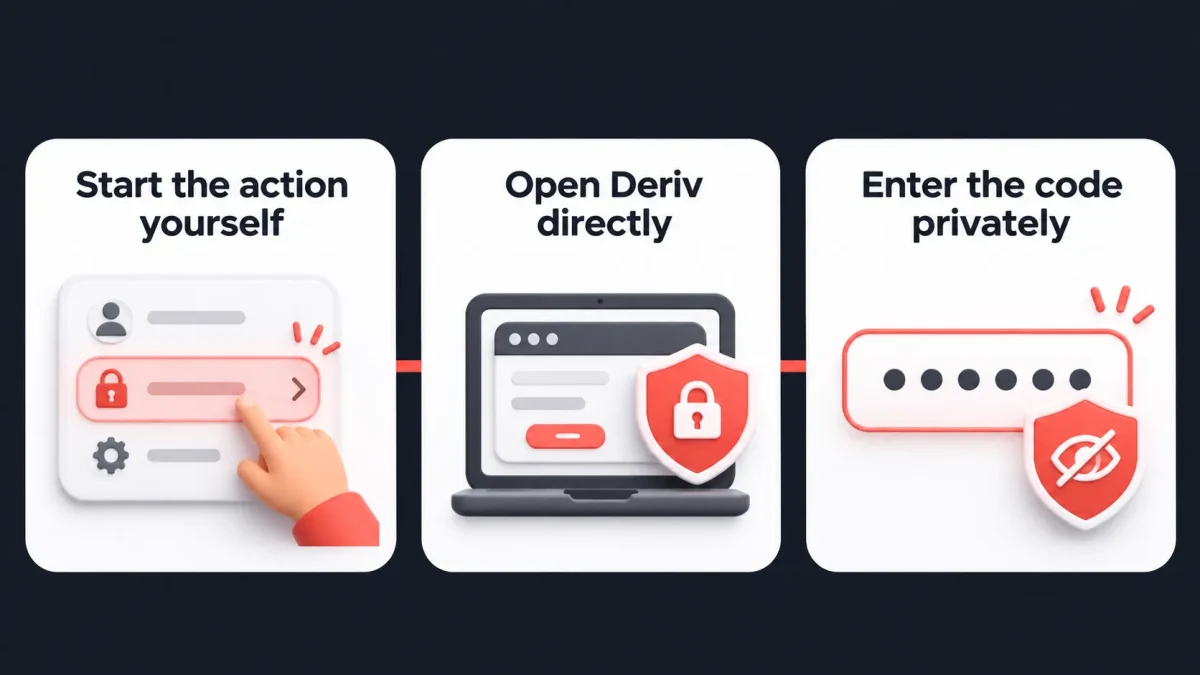
Three cards show starting an account action, opening Deriv directly, and privately entering a secure code in the official platform.

ⵎⴰⵎⵏⴽ ⴰⴷ ⵜⵙⵎⵓⵏⵎ ⵉⵎⵉⵔⵏ ⵏ ⵓⵙⵎⵓⵏ ⵙ ⵓⵎⴰⵏ

ⵉⵎⵉⵔⵏ ⵏ ⵓⵙⵎⵓⵏ ⵉⵎⵣⵡⴰⵔⵏ ⵙⵖ ⵉⵎⵉⵔⵏ ⵏ ⵜⵉⴽⴽⴰⵍ ⵢⴰⵜ ⵉⵎⵓⵏⵏ, ⵎⴰⵛⴰ ⵜⵣⵎⵔⵏⵜ ⴰⴷ ⵙⵡⵓⵔⵏⵜ ⴰⵔ ⴰⴷ ⵜⵜⵓⵙⵎⵔⵙⵏⵜ ⵏⵖ ⴰⴷ ⵜⵜⵓⵙⵏⴼⵍⵏⵜ. ⵜⵜⵓⵙⵙⵓⵎⵔⵏⵜ ⵉ ⵜⵓⵙⵙⵓⵏⵉⵏ ⵜⵉⵎⵓⵣⵣⵉⵏ, ⴰⵎⵎ ⵜⵓⵔⴰ ⵏ ⵓⵙⵏⵎⵎⵓⵏ ⵏ ⵓⵎⵙⵙⵓⵏ authenticator.

ⵙⵎⵓⵏⵜ ⵜⵉⵏⵏ ⴳ ⵓⴷⵖⴰⵔ ⵏⵏⵉ ⵜⵣⵎⵔⵎ ⴰⴷ ⵜⴽⵛⵎⵎ ⵖⵔⵙ ⵎⵉ ⵉⵇⵇⴰⵏ, ⵎⴰⵛⴰ ⵓⵔ ⵉⵣⵎⵔ ⵢⴰⵏ ⴰⴷ ⵉⴽⵛⵎ ⵖⵔⵙ. password manager ⵉⵣⵎⵔ ⴰⴷ ⵉⴳ ⴰⵙⵏⵜⵍ ⵉⵍⵍⴰⵏ ⴰⵎⴰⵏ ⵎⵔ ⵉⵍⵍⴰ ⵜⵜⵓⵎⵓⵔⵏ ⵙ ⴰⵙⵔⵖ ⴰⵎⵇⵇⵔⴰⵏ ⴷ 2FA. ⵜⴰⵏⵙⵅⵜ ⵜⵜⵓⵎⵓⵔⵏ ⴱⵍⴰ ⴰⵙⵓⴷⴷⵉⵙ ⵜⵣⵎⵔ ⴰⴷ ⵜⴳ ⴰⵙⵏⵜⵍ ⵉⵍⵍⴰⵏ ⴰⵎⴰⵏ.

ⵓⵔ ⵜⵙⵎⵔⵙⵎ:

  • ⴰⵙⵎⵓⵏ ⵏ ⵉⵎⵉⵔⵏ ⵏ ⵓⵙⵎⵓⵏ ⴳ ⵓⵙⵏⵓⴱⴳ ⵏ ⵓⵎⴰⵢⵍ ⵏⵖ ⴰⵏⵙⵉⵡ ⵏ cloud ⵓⵔ ⵜⵜⵓⵎⵓⵔⵏ
  • ⴰⵙⵎⵓⵏ ⵏⵏⵙⵏⵜ ⴳ ⴰⵍⴱⵓⵎ ⵏ ⵜⵥⵕⵉ ⵜⴰⵎⴰⵏⵓⵏⵜ ⵏⵖ ⵜⵜⵓⴱⴹⵓⵏ
  • ⴰⵣⵏ ⵏⵏⵙⵏⵜ ⵉ ⵓⵎⴰⵏⵏⵓⵏ ⵙ ⵜⵖⴰⵡⵍⵜ
  • ⴰⴱⴹⵓ ⵏⵏⵙⵏⵜ ⵉ ⵓⵎⴷⴷⵓⴽⵍ, ⴰⵎⴰⵢⵏⵓ ⵏ ⵜⴰⵡⴰⵔⵜ ⵏⵖ ⵢⴰⵏ ⵉⵙⵏⵓⵔⴰⵏ ⵉⵎⵎⵓⵍⴰⵏ ⴰⴷ ⵉⵙⵎⵔⵙ
  • ⴰⵙⵔⵏⵓ ⵏⵏⵙⵏⵜ ⴳ ⵜⵡⵍⴰⴼⵜ ⵏ ⵜⵥⵕⵉ ⵏ ⵓⵙⵏⵜⵍ

ⵎⵔ ⵜⵙⵙⵓⴼⵖⵎ ⵉⵎⵉⵔⵏ ⵏ ⵓⵙⵎⵓⵏ ⵉⵎⴰⵢⵏⵓⵜⵏ, ⵙⵏⴼⵍⵜ ⵜⵉⵏⵏ ⵉⵜⵜⵓⵙⵙⵓⵏⵖⵏ ⵙ ⵓⵎⴰⵏ ⵖⴰⵙ ⴰⴷ ⵓⵔ ⵜⵙⵙⵓⵔⵉⵎ ⵅⴼ ⵉⵎⵉⵔⵏ ⵓⵔ ⵉⵍⵍⵉ ⵉⵙⵡⵓⵔⵏ.

ⵎⴰ ⵉⵇⵇⴰⵏ ⴰⴷ ⵜⴳⵎ ⵎⵔ ⵜⴱⴹⵓⵎ ⴰⵎⵉⵔ

ⴰⵎⵉⵔ ⵉⵜⵜⵓⴱⴹⵓⵏ ⵓⵔ ⵉⵍⵍⵉ ⵉⵣⵎⵔ ⴰⴷ ⵉⴳ ⴰⵎⴰⵏ ⴰⴷ ⵉⵜⵜⵓⵙⵎⵔⵙ, ⴰⵍⵍⴰ ⵎⵔ ⵓⵔ ⵉⵙⵡⵓⵔ ⴰⵔ ⵜⵉⵏⴰ. ⵙⵔⵉⵔⵜ ⵙ ⵜⵉⵖⵔⵉⵡⵉⵏ ⵜⴰⵏⴰⵡⴰⵏⵉⵏ ⵖⴰⵙ.

  1. ⵓⵔⵉⵜ Deriv ⵙ ⵓⵎⵓⵔⵏⵉⵏⵏⵓⵏ ⵙ ⵓⵙⵉⵜ ⵏⵖ ⵜⵙⵏⴰⵔⵜ ⵜⴰⵏⴰⵡⴰⵏⵜ.
  2. ⵙⵏⴼⵍⵜ ⴰⵙⵔⵖ ⵏ Deriv ⵏⵏⵓⵏ ⵖⵔ ⵢⴰⵏ ⵉⵎⴰⵢⵏⵓ ⵉⵎⵣⴰⵔⴰⵢⵏ.
  3. ⵙⵏⵇⴰⴷⵜ ⵜⵉⵙⵓⵙⵎⵉⵏ ⵏ 2FA ⴷ ⵜⵉⵖⵔⵉⵡⵉⵏ ⵏ ⵓⵙⵎⵓⵏ.
  4. ⵙⵏⴼⵍⵜ ⴰⵎⴰⵢⵍ ⵏ ⵓⵎⵎⴰⵙ ⵉⵜⵜⵓⵔⴱⵓⵏ ⵙ Deriv, ⵙⵓⴳⴳⵔ ⵎⵔ ⵉⵣⵎⵔ ⴰⴷ ⵉⵜⵜⵓⵎⵓⵔ ⵜⵉⵏⵏ ⵏ ⵓⵙⵏⴼⵍ ⵏ ⵓⵙⵔⵖ.
  5. ⵙⵙⵙⵡⵔⵎ ⴰⴷ ⵜⵏⵖⵎ Deriv ⵙ ⵜⵡⵓⵔⵉ ⵏ ⵓⵎⵙⵎⵔⵙ ⴰⵖⵔⴰⴱⵓ ⵎⴰ ⵜⵙⵓⵍⵎ ⵙⴳⴳⵉ ⴰⵔ ⵉⵍⵍⴰ ⵢⴰⵏ ⵉⴽⵛⵎⵏ ⵖⵔ ⴰⵎⴰⴽⵓⴷ ⵏⵏⵓⵏ.
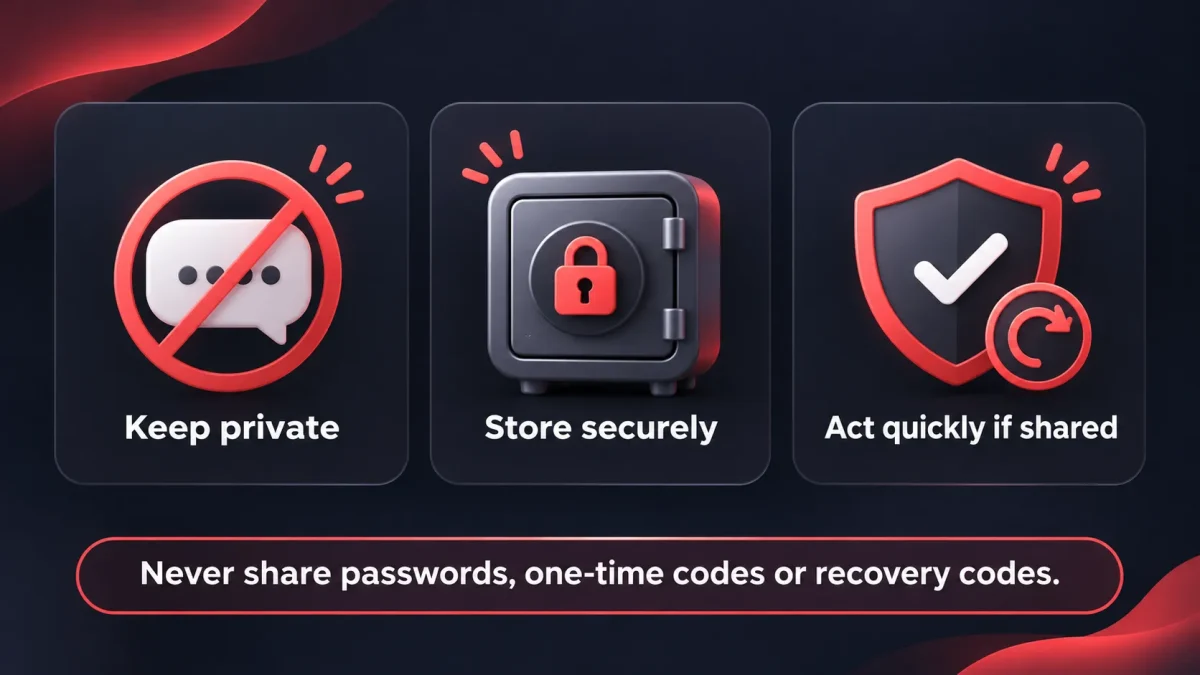
Three cards advise keeping codes private, storing recovery codes securely, and protecting an account promptly if a code is shared.

ⵙⵙⵓⵙⵎ ⴰⵖⴰⵔⴰⵙ ⵏ ⵓⵙⵎⵔⵙ ⵏ ⵉⵔⵎⵣ ⵉⵎⴰⵏⴰⵏ

ⴽⵔⴰⵜ ⵏ ⵜⵎⵙⴽⵉⵡⵉⵏ ⵜⵓⵙⵙⵏⵉⵏ ⵜⵙⵙⵓⵍⵍⴰⵏ ⴰⴷ ⵜⵙⵍⵎⵎ ⵜⵓⵜⵔⴰⵜ ⵏ ⵉⵔⵎⵣ ⵉⵎⴰⵏⴰⵏ ⵙ ⵓⵙⵓⵍⵍⵉ:

  • ⵙⵙⵓⵙⵎ ⵜⵉⵎⵙⴽⵉⵡⵉⵏ ⵏ ⵓⵎⴰⴽⵓⴷ ⵖⵉⵙ ⵙⴳ ⵜⵔⵉⵔⵉⵜ ⴰⵖⵔⴰⴱⵓ ⵏ Deriv ⵏⵖ ⵙⴳ ⵜⵙⵏⵜⵉⵏⵜ ⴰⵖⵔⴰⴱⵓⵏ.
  • ⵙⵎⵔⵙⵎ 2FA ⴳ ⵓⵎⴰⴽⵓⴷ ⵏⵏⵓⵏ ⵏ Deriv ⴷ ⴳ ⵓⵎⴰⴽⵓⴷ ⵏ ⵓⵎⴰⵢⵍ ⵉⵜⵜⵓⵔⴱⵉⵜⵏ ⵙⵉⵏⵏⵙ.
  • ⵖⵔⵎ ⵜⵉⵏⵖⵎⵉⵙⵉⵏ ⵏ ⵓⵙⵏⵓⵍⴼⵓ ⵙ ⵓⵙⵓⵍⵍⵉ ⴷⴰⵖ ⵜⵙⵙⵓⵍⵍⴰⵎ ⴰⴷ ⵜⴽⵛⵎⵎ ⵖⵔ ⵜⵎⵙⴽⵉⵡⵜ.
  • ⵃⴹⵔⵎ ⵉⵔⵎⵣ ⵏ ⵓⵙⵎⵓⵜⵜⵉ ⴳ ⵢⴰⵏ ⵓⵙⵉⵜ ⵉⵜⵜⵓⵃⴹⵓⵏ ⴷⴰⵖ ⵜⴰⵔⵓⵔⴰⵎ ⴰⴷ ⵜⵙⵎⵔⵙⵎ ⵜⵏ.
  • ⵓⵔ ⵜⵇⴱⵍⵎ ⵓⵍⴰ ⵜⵏⵓⵍⴼⵎ ⴰⵔⵎⵣ ⵉ ⵜⵎⵙⴽⵉⵡⵜ ⵉⵔ ⵓⵔ ⵜⴱⴷⵓⵎ.
  • ⵎⴰ ⵉⵍⵍⴰ ⵢⴰⵏ ⵉⵜⵜⵔⵉⵏ ⴰⴷ ⵜⴱⴹⵓⵎ ⴰⵔⵎⵣ, ⵙⵙⵎⵔⵜ ⴰⴷ ⵜⵙⵙⵉⵡⵉⵎ ⴷ ⵜⵙⵏⵓⵍⴼⵎ ⵙ ⵓⵙⵙⵓⵍⵉ ⵏⵏⵓⵏ ⵎⵉⵏ ⵉⵍⵍⴰⵏ.

ⴹⴼⵕⵎ ⴰⵏⴳⴰⵔⴰⵡ ⵉⵏⵓⵔⵔⵉⵏ

ⵙⵙⵏⵜⵉⵎ ⵎⴰⵏⵉ ⵜⵃⴹⵔⵎ ⵉⵔⵎⵣ ⵏ ⵓⵙⵎⵓⵜⵜⵉ ⴷ ⵙⵙⵓⵍⵍⵉⵎ ⵎⴰ 2FA ⵉⵜⵜⵓⵙⵙⵉⵔⵉⴷ ⴳ ⵓⵎⴰⴽⵓⴷ ⵏⵏⵓⵏ ⵏ Deriv ⴷ ⵓⵎⴰⵢⵍ ⵉⵜⵜⵓⵔⴱⵉⵜⵏ ⵙⵉⵏⵏⵙ. ⵎⴰ ⵜⴽⵛⵎⵎ ⴰⵔⵎⵣ ⵉ ⵜⵎⵙⴽⵉⵡⵜ ⵉⵔ ⵓⵔ ⵜⴱⴷⵓⵎ, ⵓⵔ ⵜⵙⵙⴽⵛⵎⵎ ⵜⵏ ⵓⵍⴰ ⵜⴱⴹⵓⵎ ⵜⵏ—ⵔⵎ Deriv ⵙ ⵓⵙⵉⵔⵉⴷ ⴷ ⵙⵙⵏⵜⵉⵎ ⵜⵉⵙⵏⴰⵙⵉⵏ ⵏ ⵜⵙⵍⴰⵎⵜ ⵏⵏⵓⵏ.

Quiz

ⵎⴰⵎⴽ ⵉⵇⵇⴰⵏ ⴰⴷ ⵜⵙⵎⵔⵙⵎ ⴰⵔⵎⵣ ⵉⵏⵣⵓⵏ?

ⵜⵙⵓⵜⵍⵉⵡⵉⵏ ⵜⵉⵏⵎⵓⵏⵉⵡⵉⵏ

Analyse markets with AI-powered insights

Explore TradersView
WhatsApp